Whatโ€™s new

Everything weโ€™ve shipped for travel advisors and agencies, newest first. These are the same release notes our customers read inside JourneyFuse.

Mid-November: Last Call to Test the Advisor App, JourneyFuse in Claude and ChatGPT, the Landing Page Studio and Simple Mode

๐Ÿ“ฑ Last call: test the JF Advisors app before it hits the app stores

The JF Advisors app is almost ready for the App Store and Google Play. Before we submit it, we'd love a few more of you to give it a real try. It now runs on iPhone and Android.

It's the JourneyFuse you reach for away from your desk: today's tasks and payments due, one inbox for every client message, trips and clients, new leads, team chat and push notifications. You sign in with an emailed code, so there's no password to remember.

To join, open https://journeyfuse.com/advisor-app on your phone. It takes about two minutes.

  • iPhone: join through TestFlight, Apple's free app for trying apps before they reach the App Store.
  • Android: tap Become a tester, then install JF Advisors from Google Play.

Then use it for a few days the way you normally work. If something is confusing, slow or missing, tell us. On iPhone, take a screenshot and TestFlight will offer to send it to us. On Android, use Send feedback on the app's Google Play page. Most of the fixes so far came from beta testers, and what you send in the next couple of weeks shapes the version that goes public.


๐Ÿค– Ask Claude or ChatGPT about your agency

You can now connect JourneyFuse to Claude, ChatGPT or Gemini and ask about your work in plain English. It's open to every agency as a beta. This came straight from the Ideas board.

Try questions like:

  • "What's on my plate this week?"
  • "Which final payments are due in the next 30 days?"
  • "Has the Smith family finished their card authorization yet?"
  • "Show me leads older than three days that nobody has accepted."
  • "What did each advisor log in commissions in October?"
  • "What's the agent portal and BDM contact for Viking?"

A few things matter here, so here's the short version:

  • It's read only. It can't send, change or delete anything.
  • You sign in as yourself. There's no shared key. Advisors see their own work, and owners and admins see the agency.
  • Client details stay out. It never returns a client's email, phone, birthday, passport, address or card details. Client names and notes stay hidden unless you turn them on for your own connection.
  • You can see what it looked at. Settings โ†’ API Keys โ†’ AI connections lists every app that's connected and every lookup from the last 7 days.
  • Owners can switch it off for the whole agency on the same page.

To connect Claude, open Customize โ†’ Connectors โ†’ Add custom connector, name it JourneyFuse, paste `https://journeyfuse.com/api/mcp` and click Connect. ChatGPT and Gemini take about the same three steps.

๐Ÿ‘‰ Full guide: https://journeyfuse.com/kb/team-settings/ai-connections


๐ŸŽจ The Landing Page Studio: make your page yours

Your landing page is the page clients land on from your agent link or business card. It always worked out of the box, but it looked like everyone else's. Now you can make it your own without building a website.

The first time you open Settings โ†’ My Landing Page, a short Make it yours list walks you through four steps: add your photo, write your headline, choose the form clients fill in, and publish. That's all you need. When you want more, open Want to do more?:

  • Change the look. Keep Classic, or pick Coastal, Safari, Riviera or Island for a new palette and fonts. Fine tune your accent color, heading and body fonts, background and how the top of the page looks. Back to Classic undoes everything in one click.
  • Move and hide sections. Put your sections in the order you want, and hide any you don't use.
  • Add your own sections: Text, Text and photo, and Planning fees, which shows up to 8 services with prices and a "most popular" pick.
  • Booking links for your cruise line agent links, Viator and shore excursion companies, shown as a simple list, photo cards or logo tiles. JourneyFuse can find each supplier's logo from the link.
  • Your form right on the page. The Start here form now loads as part of your page, in your page's fonts and colors.

๐Ÿ‘‰ Full guide: https://journeyfuse.com/kb/client-portal-sharing/advisor-landing-pages


๐Ÿฐ Disney and Universal HQ, built for park days

If you plan Disney or Universal trips, the park side of the trip got a lot better this month.

  • Ride notes and height checks. Add notes to the rides on each park day, and see at a glance which rides the shortest person in the party can't go on.
  • Dining, organized around opening day. A countdown to when dining opens, with a reminder task. Keep a Wish list, mark picks as To book, Booked or Waitlisted, and put each one on a park day.
  • Today's dining on the Park plan. Each day lists its dining reservations, and character meals are tagged on the itinerary.
  • Crowd forecasts on Disney HQ and Universal HQ for the next 30 days, each park scored against years of its own real wait times.
  • One rail for parks-and-cruise trips. The parks leg and the cruise leg share one Next up list, so both sides agree on what's done.
  • Hide a rest day's card from the itinerary without un-marking the day.

๐Ÿ‘‰ Full guide: https://journeyfuse.com/kb/disney-universal/disney-universal-hq


๐Ÿ—ณ๏ธ The Ideas board: you vote, we build

Have an idea for JourneyFuse? Go to https://journeyfuse.com/support/ideas. Search first to see if someone already suggested it, then vote, comment or follow it. When an idea's status changes, everyone who voted gets an email. A roadmap strip at the top shows what's Under review, Planned, Building and Just shipped.

These ideas shipped from the board this month:

  • JourneyFuse in Claude and ChatGPT (above).
  • Private advisor notes for cruise ports (15 votes). Every port in a cruise port guide now has a note only you can see. Write it once and it shows on every trip in your agency that stops there. Your client-facing port note works the same as before.
  • Book Viator tours from the proposal (14 votes). Add a Viator link to a "Client books" tour. Your client sees the price as a guide and a Book on Viator button that uses your own agent link. When they tap Booked it?, the tour lands on the trip as a confirmed booking and you get a notification.
  • A planning fee for each answer on a form. One form can now charge by party size, trip type or anything else you ask.
  • Archive several clients at once from the Clients list.

๐Ÿ‘‰ How the board works: https://journeyfuse.com/kb/getting-started/ideas-board


๐Ÿ’ต Invoices and payments, simpler

We rebuilt how money works on a trip, so the number on every screen is the same number.

  • One payment plan per trip. A new booking adds to it instead of starting a second invoice, and you can combine a trip's existing invoices into one plan.
  • A one-page invoice you edit right where you read it. The payment schedule matches the proposal.
  • Money check. The trip's Payments tab tells you whether the money adds up, and a Money check page next to Invoices shows every trip that doesn't.
  • Each traveler sees only their share. Turn this on per invoice for group and split trips.
  • Add multiple payments to a schedule at once, and Add a charge puts extras on the same plan.
  • Invoice notes for the agency. Write your default notes once and they're on every new invoice.

The trip's Bookings tab also got a redesign, with a status summary, To finish chips and one "needs" line per booking. The booking form now asks How does the client pay for this?, so the money is right from the start.


๐Ÿงฎ Simple mode: commissions without the back office

If your agency has 10 or fewer agents and you run payroll yourself, Simple mode is built for you. Everything is on one page, with no submissions or review steps. This month it got a lot easier to run payday:

  • Should be in your bank is now one card at the top. A bar shows what the total is made of: ready to pay now, held for trips that haven't traveled, and money not yet matched to a booking.
  • Enter a payment and Upload a statement sit right in the header.
  • Pay all, then hand it to payroll. Download the who-and-how-much list for ADP, QuickBooks or whatever runs your payroll, and record the payout as paid by Payroll.
  • Each agent gets their statement by email when you pay them.
  • Take an amount off someone's next payout, for a deduction or a fee.
  • Agents are listed A to Z, so the page reads down next to your payroll.
  • See each agent's booked future travel, and add a commission right from their row.
  • Starting out solo? An agency owner gets the Agency view before inviting anyone, so it's all set up when your first agent joins.

Turn it on in Settings โ†’ Commissions โ†’ Payouts & Tax โ†’ Simple mode.

๐Ÿ‘‰ Full guide: https://journeyfuse.com/kb/commissions/commission-reconciliation


๐Ÿงญ Proposals

  • Compare cruise routes side by side on the multi-option Price cards page.
  • Price an add-on by cabin category.
  • Refundable deposit tag on an option.
  • Travel protection price shown beside the trip total.
  • Hotel stay and Tour in Add to this option.
  • QR code next to Copy link, for clients sitting across the desk.
  • When the client approves: choose to ask for a card, or approve only.

๐Ÿ›Ÿ The Insurance dashboard

Every deposited or paid trip leaving in the next 12 months now has one place for insurance. It shows who still needs a quote, whose window has closed, who leaves soon without an answer and who was never asked. It also shows traveler policies that end before a later trip, and every signed record on file. You can resend a travel protection quote without starting over.

๐Ÿ‘‰ Full guide: https://journeyfuse.com/kb/trips-proposals/insurance-dashboard


โœจ Smaller things you'll notice

  • Forward lead emails into JourneyFuse. Each advisor gets their own lead forwarding address in Settings โ†’ Email. Forward an inquiry, or set a Gmail filter, and it becomes a lead assigned to you.
  • One box to find a flight, everywhere you enter one. Search airports by city, and drop a PDF or screenshot into flight import.
  • Duplicate Trip can copy the bookings and the trip documents too.
  • Library: one search across your whole Library, a cover on every card, and two new types: Activities & extras, and Transportation.
  • Itineraries: save several welcome notes and pick one, add a library guide to several days at once, and Expand to see every card on a day in full.
  • Forms: request a card authorization from a form response, a photo on the form's link preview, add people as Clients instead of Leads, and a Title color setting.
  • Clients: a sortable Birthday column, Request info for everyone you tick, and see when a client last opened their portal.
  • Cards: remind the client until a card request is done, and ask for the CVC before a scheduled charge.
  • Groups: hide sold-out packages, a group cover photo on every member's trip, booking-page add-on picks on All bookings, and a test run filled with sample travelers.
  • Automations: a cleaner overview and step editor, and Send it when so a step only goes to trips that fit.
  • Trips tell you on every tab when emails are waiting for your approval, and show a banner when a trip's automations are off.
  • Price watches in Canadian dollars, linked to the trip's invoice and payments.
  • Meetings: special hours for chosen meeting types, and the guest's phone number on the meeting row.
  • A Text button next to every client-link Copy button.

Thank you for every vote, ticket and call. Keep the ideas coming on the board.

Tim
Mid-October: The JF Advisors App, Square, Viator, the Clipper and Simple Mode for Agencies

๐Ÿ“ฑ The JF Advisors app is in beta

JourneyFuse now comes with a phone app for you and your team. It's separate from the trip app your clients use. This one is for advisors.

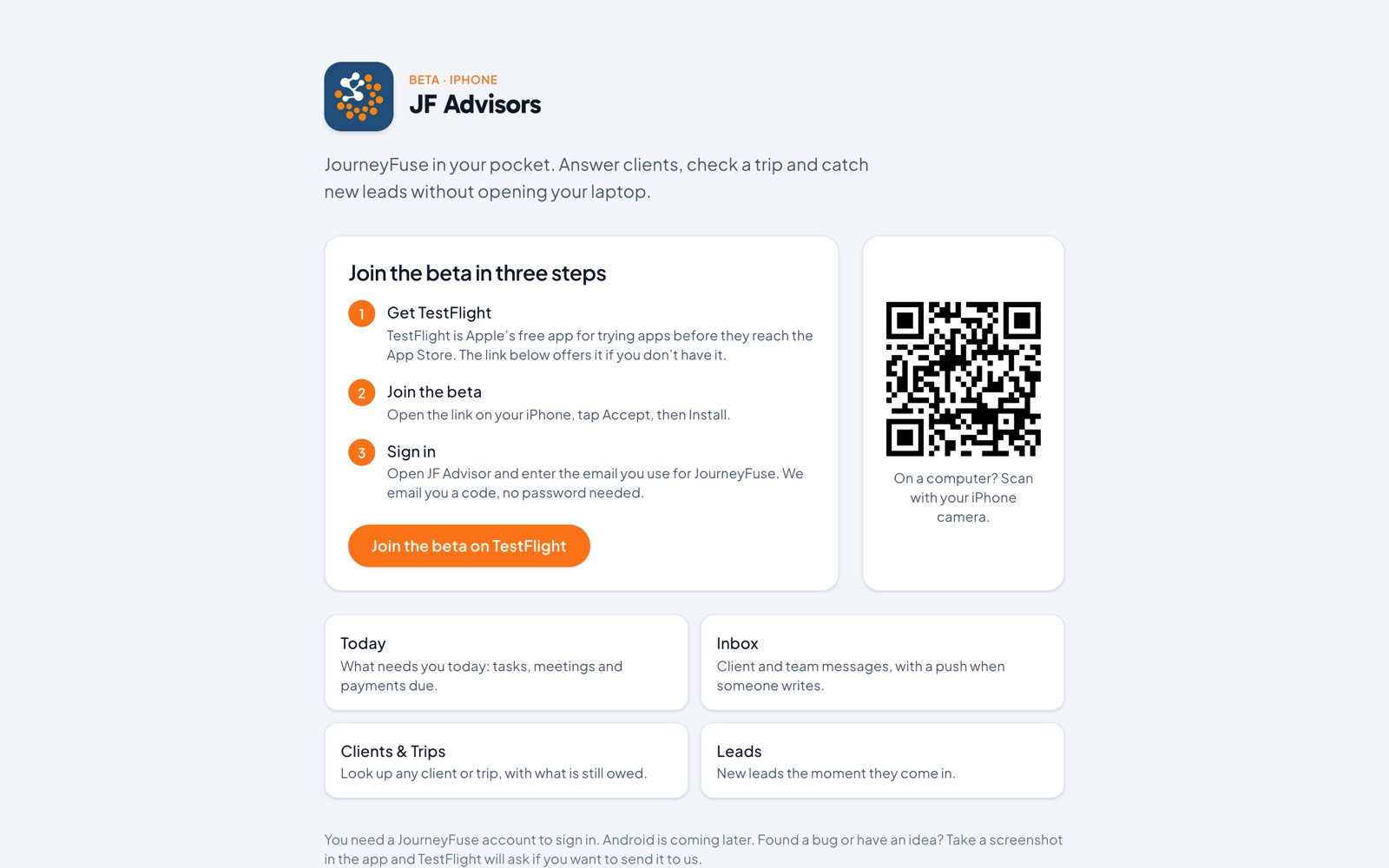
The JF Advisors beta page: join in three steps on TestFlight

It covers what you reach for between meetings, on a plane or in the car line:

  • Today: your tasks, who's departing soon, payments due this week and new leads, all on one screen.
  • One Inbox for every client conversation, whether it came in by email, text or the portal. You reply on the same channel the client used.
  • Trips and clients with bookings, travelers, payments and documents. You can record a payment from your phone.
  • Leads. See new leads and move them along.
  • Push notifications for client messages, new leads, tasks, payments and team chat. Each one has its own switch.
  • Team chat with your agency.
  • Sign in with an emailed code. There's no password, and you can add an optional Face ID lock.

It's on iPhone first. To join the beta, open https://journeyfuse.com/advisor-app on your phone. We'd love your feedback. Most of the first round of fixes came from beta testers.

๐Ÿ‘‰ Full guide: https://journeyfuse.com/kb/getting-started/advisor-app


๐Ÿ’ณ Take client payments with Square

Many of you asked for this. If your agency already runs on Square, you can now collect client money there instead of Stripe. Planning fees and group fund payments go straight to your Square account and show up in your Square Dashboard like any other sale.

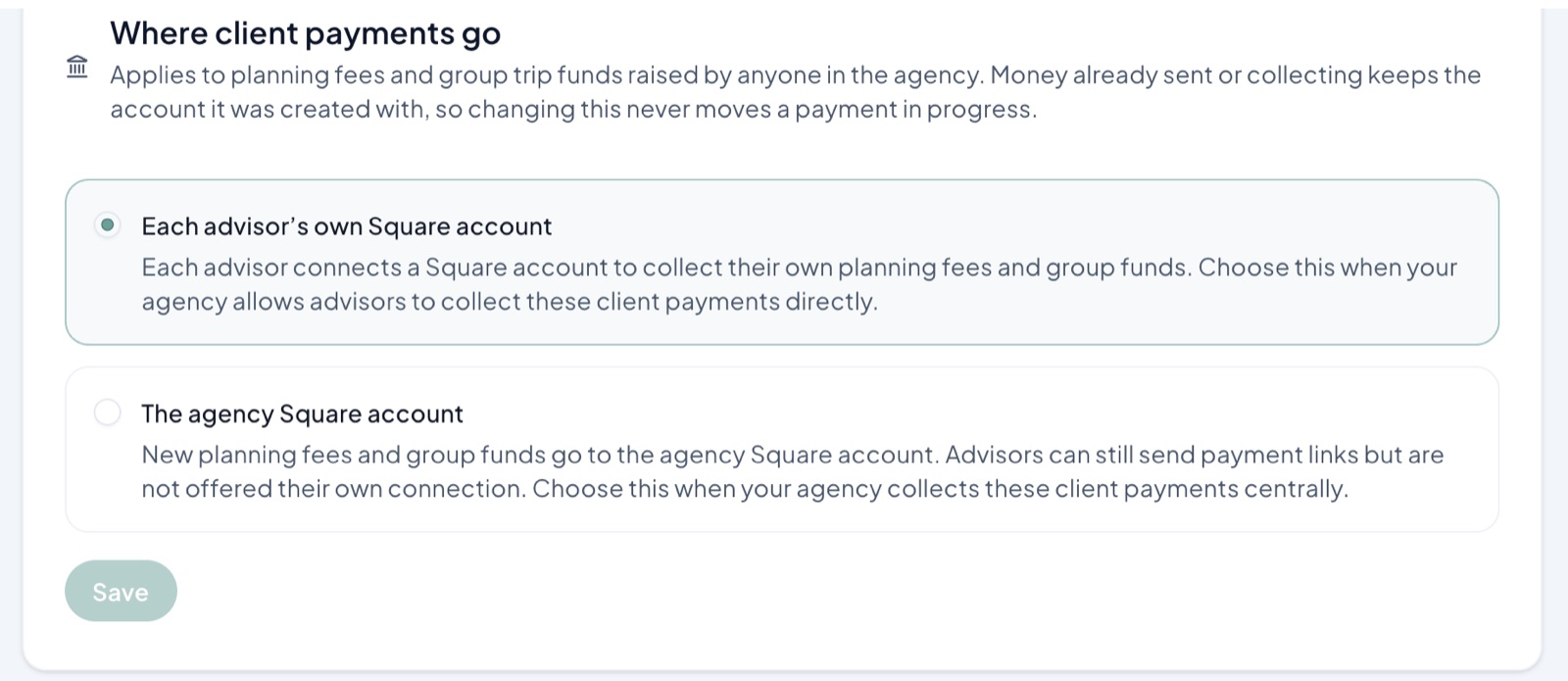
Settings โ†’ Payments: choose where client payments go, each advisor's Square account or the agency's
  • Switch in Settings โ†’ Payments. The Payments page is now split into three tabs, and Stripe and Square sit side by side.
  • Your clients get the same branded payment link. They pay on Square's checkout with a card, Apple Pay, Google Pay or Cash App Pay.
  • Square follows your money setup. If advisors collect their own payments, each advisor connects their own Square account. If the agency collects everything, an owner connects the agency account once.

Stripe stays the default, so nothing changes until an owner or admin switches.

๐Ÿ‘‰ Full guide: https://journeyfuse.com/kb/invoicing-payments/square-payments


๐ŸŽŸ๏ธ Viator is live for every agency

You can add Viator tours to trips and proposals without retyping anything. The title, photos, write-up, inclusions, length, meeting point and cancellation terms all come in for you. The price comes in your agency's currency at Viator's own rate, so it matches what your client sees.

There are three ways to add a tour:

  • Paste a Viator link into AI Import, on a trip or a proposal.
  • Search Viator from an excursion card in the itinerary builder.
  • Pick from the tours that fit a port day in a cruise's port guide (more on port guides below).

The Book on Viator button on the client's itinerary carries your own Viator Travel Agent ID, so the commission is yours. Add your Travel Agent link once in Settings โ†’ Profile.

๐Ÿ‘‰ Full guide: https://journeyfuse.com/kb/trips-proposals/viator-tour-search


โœ‚๏ธ The Clipper is in the Chrome Web Store

Google approved the JourneyFuse Clipper, so anyone can install it now. It's still labeled beta, but there's no zip file to download and Chrome keeps it up to date for you.

The Clipper saves tours, excursions and hotels from any website straight onto a trip, on the day you pick. It can also bring over your task lists, email templates and automations from your old CRM.

Go to https://journeyfuse.com/clipper and click Add to Chrome. If you're using the old beta zip, remove it and install the Web Store version. You won't lose anything you clipped.


๐Ÿงฎ Simple mode: commissions for smaller agencies

The full commissions system is built for bigger agencies, with advisor submissions, review steps and deposit checks. If you have fewer than about 20 agents and run payroll yourself, you probably don't need most of that. Simple mode puts everything on one page.

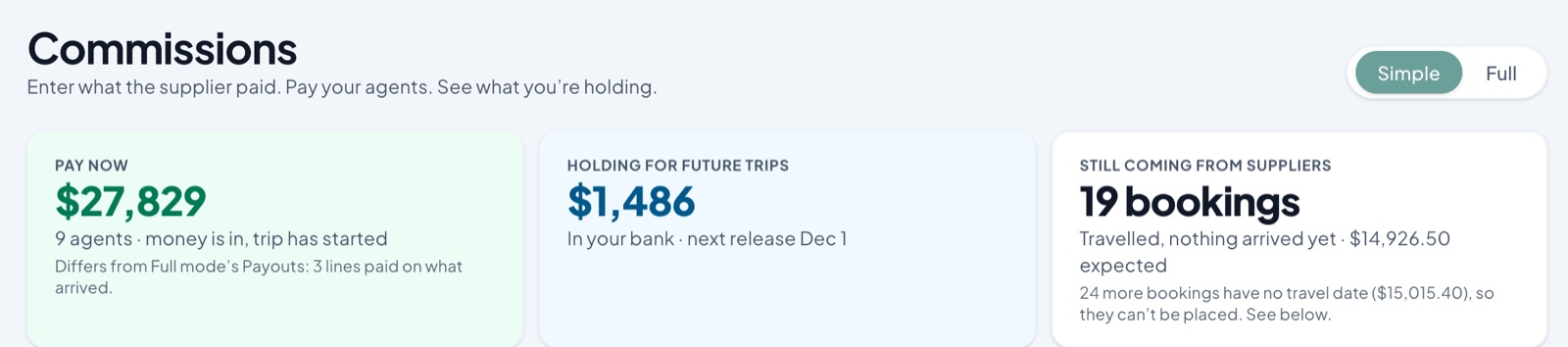
At the top are three totals:

  • Pay now: money that has arrived for trips that have already started.
  • Holding for future trips: money in your bank for trips that haven't traveled yet, with the date the next one releases.
  • Still coming from suppliers: trips from the last year where nothing has been received yet.
Simple mode: Pay now, Holding for future trips, Still coming from suppliers

Below that is one row per agent. Click a row to see the bookings behind it.

  • Enter a payment: pick the supplier, the amount and the date, then add the bookings it covers. Each booking closes at what actually arrived, and the agent gets their split of that amount.
  • Upload a statement instead of typing it in.
  • Missing booking? Add it while you enter the payment.
  • Pay now on held rows, Pay what arrived on short ones, and check a short or over line right from the agent's row.

Turn it on in Settings โ†’ Commissions โ†’ Payouts & Tax โ†’ Simple mode.

๐Ÿ‘‰ Full guide: https://journeyfuse.com/kb/commissions/commission-reconciliation


๐Ÿ’ผ Commissions, polished all the way through

If you run the full commissions system, nearly every page got cleaner this month.

  • Today follows the money: Imports, then Inbox, then Payouts. A statement in the Inbox now collapses to one row with a single Process button.
  • Every page opens with a summary strip, including Advisors, Suppliers, Ledger, Payouts, Deposits and Catch Up. Search and sort sit right in the table header.
  • More statements are read exactly instead of by AI guesswork: Carnival, MSC, Princess and Virgin Voyages Paymode, NCL, Allianz, Chubb, Travel Insured, Marriott, ALG Vacations, Project Expedition and more.
  • $0 statement lines mark their bookings as Not commissionable. They don't sit open forever.
  • Duplicate check: you get a warning when you upload the same statement twice, or one whose rows are mostly on file already.
  • Smarter advisor matching by nickname, a learned alias, or another spelling or surname.
  • Statement sources show how each supplier's statements arrive, and which months are missing.
  • Advisors see where their money is with stage tiles: Trip not done, In review, Waiting on payment, Paid to you.
  • Mentor and team-lead splits can be paid from the agency's share.
  • Bulk accept and Process all run in a small dock in the corner, so you can keep working while they finish.
  • Every commission row opens its booking, advisor or supplier.

๐Ÿงพ A new way to start a proposal, and a new editor

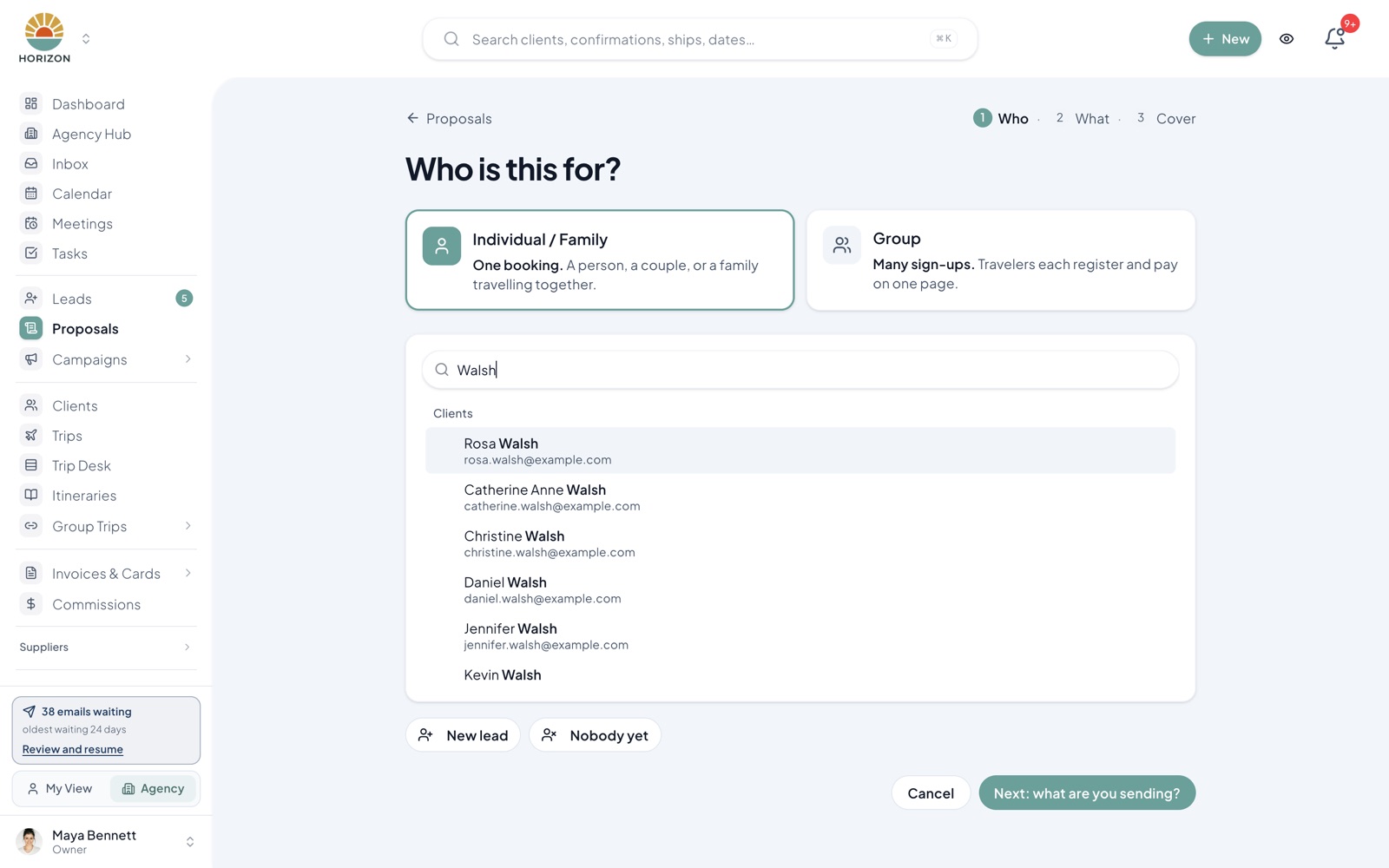
The new proposal editor is now the default. A new proposal opens with three quick steps: Who it's for, What you're sending, and the Cover. If you start from a lead, the destination and dates are already filled in. From there, the editor takes you one card at a time. A readiness rail shows what's left, and Review & send lists exactly which field still needs fixing.

Starting a proposal: Who is this for?

Other proposal additions this month:

  • AI Import reads room ladders and per-person cruise fares and builds a compare-every-room grid.
  • Per-person room pricing, with a step-up line like "+$80 pp."
  • Expected commission on an option, as a rate or a flat amount. It carries into the booking when the client accepts.
  • Children's ages, flowing in from your lead forms.
  • "Paid at destination" add-ons for resort fees.
  • Cruisetours (Princess and Holland America Land+Sea) in Find your cruise.
  • A full payment list for installment plans, rounded to whole dollars, with skippable months.
  • Option text translated to Spanish on Spanish-language proposals.

Classic is still one click away until about October 24.

๐Ÿ‘‰ What moved where: https://journeyfuse.com/kb/trips-proposals/new-proposal-editor


โš“ Port Day Score and port guides on every cruise day

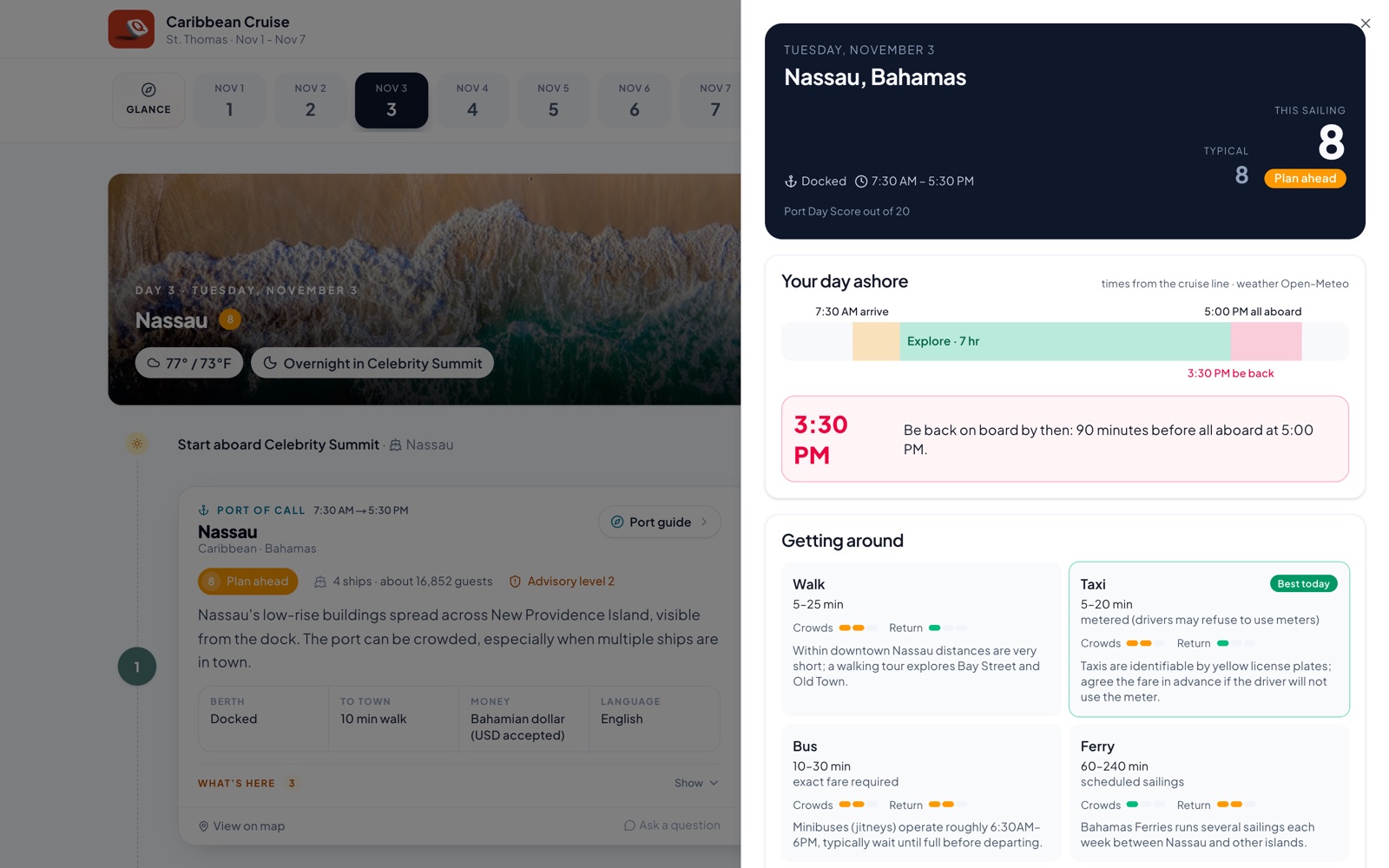
Every port day on a cruise itinerary now shows a Port Day Score out of 20. It rates getting ashore, crowds, conditions and the risk of missing the ship, so you can see right away whether a day is easy or tight. Your clients see it too.

A Nassau port day with its Port Day Score, be-back-by time and getting-around options

Tap the score for the port guide:

  • A be-back-by timeline and whether you dock or tender.
  • Hourly weather and swell, plus any active storms nearby.
  • Other ships in port that day, so you can plan for crowds.
  • Travel advisories from the US, UK and Canada.
  • Getting around, what fits your day, and things to know before you go.
  • Accessibility-first details for travelers who need them, such as hilly terrain or transport needs.
  • Local emergency numbers.
  • Viator tours at that port.
  • Your own note for each port, which clients see under From your advisor. You can also set one agency photo for a port, and it fills every day you're there.

๐Ÿ‘‰ Full guide: https://journeyfuse.com/kb/trips-proposals/port-day-guide


๐Ÿ—บ๏ธ The itinerary builder, rebuilt

The builder is faster to work in and closer to what your client actually sees.

  • A tight day list with item rows and a time gutter. Day headers are one row, with Preview trip and a Client view slide-out.
  • Edit cards in place, including flights, hotels, transfers, dining and notes.
  • Travelers can add their own plans from their phone, and you see who booked what.
  • A welcome note at the top of At a glance.
  • A cleaner client view with a slimmer header, a compact list view, and runs of empty days folded into one.
  • Hide Day Start and Day End on one day or every day, and hide a hotel's phone and website from clients.
  • Deleted itineraries can be restored for 90 days.

๐Ÿค– Ask Fuse can build the trip for you

Ask Fuse is now a real trip assistant. It reads the whole itinerary, finds real places, checks travel times and flags timing problems. Every change it suggests comes to you as a preview, and nothing is saved until you approve it. You can also undo.

Ask it to build this trip and it lays out the days for you. The AI Builder button in the builder now opens Fuse.

๐Ÿ‘‰ Full guide: https://journeyfuse.com/kb/trips-proposals/ask-fuse


๐Ÿงช A practice workspace for every member

Want to try a new automation, test an email template or train a new hire without risking a real client? Open the workspace switcher and choose Practice workspace.

You get a private copy of your agency's setup, including branding, settings, templates, forms, automations, tags and suppliers. It's filled with made-up clients, trips and proposals. Nothing in practice reaches a real person: emails come to you, texts and push notifications never send, and no card is charged. You can reset it any time.

๐Ÿ‘‰ Full guide: https://journeyfuse.com/kb/getting-started/practice-workspace


โœจ Smaller things you'll notice

  • Customize your dashboard. Drag cards around, resize them, and add any of seven new cards.
  • Better hotel photos and details on itinerary hotel cards and bookings.
  • One emailed 6-digit code signs you in on the website, the client portal and the apps.
  • Trip tracking numbers for each advisor, shown above the trip name and searchable.
  • Tasks can repeat, can have steps inside them, and can say who you're waiting on.
  • One trip can pay for another, for group trips where one family covers another.
  • Create invoices for every family on a linked group in one click.
  • Paste a traveler list (text or a screenshot) to add a whole party with dates of birth.
  • Reservations tracker: phone-first family cards, a Requested status, and one tap to add a confirmation.
  • Zoom is live for Meetings, and you can hand a booked meeting to a teammate.
  • Campaigns show which link each person clicked, and you can tag people by it. There's also a dark mode preview.
  • Edit a scheduled email before it goes out. Unsent emails are kept as drafts.
  • Drop a Library guide into any email as a button.
  • Insurance: a Manage your policy link for clients and an insurance waiver button for emails.
  • Disney dining and Lightning Lane window merge fields.
  • Perks: country rewards programs remind you on trips to that country.
  • Packing lists: reorder sections, edit items in place, and add a Do not pack warning list.
  • Clients: add several tags at once, a separate mailing address, and a monthly celebrations list.
  • Portal: hide a trip from the client portal, show when each balance is due, and a Sign out button for shared computers.
  • Several agreement templates per agency.
  • Mixed seat billing, where the agency covers some agents and others pay their own.

Thank you for every ticket, call and suggestion. Most of what's above came straight from you.


๐Ÿ‘‹ A quick note from Tim

I'll be out from October 22 through November 2. Normally I handle the day shift on support, so while I'm away, replies will come a little slower than you're used to. You'll still hear back within 24 hours. Keep sending tickets the usual way. Nothing about how you reach us changes.

Thank you for your patience. I'll be back before you know it.

Tim

October Updates: Meetings, Smarter Groups, Forms Anywhere and More

๐Ÿ“… Meetings: one more tool you can cancel

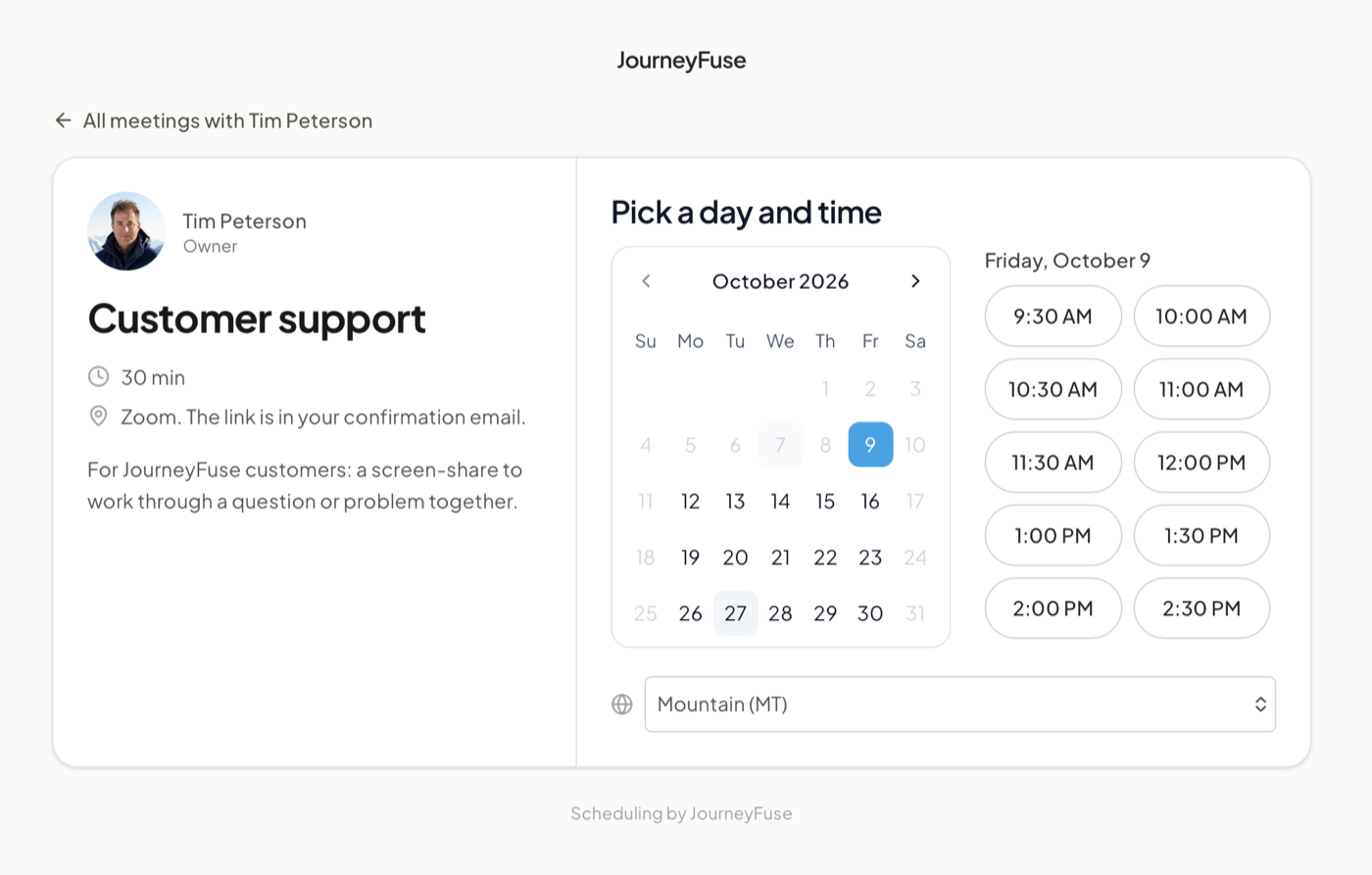
We like to say JourneyFuse can replace a lot of the tools you pay for, and this month we added a big one. If you've been sending clients a Calendly link, you can stop. Meetings is built right in.

Here's how it works. You get one link for your website, your email signature or Instagram. A prospect opens it, picks a time you're free, answers a couple of questions, and that's it. They're booked, and you didn't have to email back and forth once.

A Meetings booking page: pick a day and time

The best part is what happens next. The booking turns into a lead with their answers already attached. It goes on your Google or Outlook calendar, and they get a real calendar invite with reminders. So when the call starts, you already know who you're talking to and what they're dreaming about.

A few things you can do with it:

  • Set up different kinds of calls, like a quick discovery chat or a full planning session, each with its own hours and questions.
  • Let people choose how to meet: phone, video, Google Meet or in person.
  • Screen certain calls first with approve-first meeting types.
  • Keep your real life protected. Pick which calendars block your time, including iCloud and family calendars.
  • Book a call for a client yourself from inside the app.
  • Let clients schedule from their portal with a Schedule a call button on your advisor card.
  • Use your own domain, with your agency's name on the page.

Open Meetings in the sidebar to set up your link. It takes about five minutes.

๐Ÿ‘‰ Full guide: https://journeyfuse.com/kb/clients-contacts/meetings


๐Ÿ‘ฅ Groups got a lot smarter

Running a group just got easier, from the first sign-up to the last payment.

  • Ask your own questions on the booking page. T-shirt sizes, dietary needs, roommate requests: answers land on each traveler's profile and in one export.
  • Fill seats from your waitlist. When rooms open up, raise the cap and invite the next families in line.
  • See who's on track at a glance. The group lead gets a director view showing Paid in full, On track or Behind for everyone.
  • School trips are built in, with student and chaperone rows and approval before registration opens.
  • Cost a group faster with agency costing templates, color-coded categories and the room-rate split.
  • Travelers can share photos in the group conversation.

๐Ÿ‘‰ https://journeyfuse.com/kb/trips-proposals/group-bookings


๐Ÿ“ Forms you can put anywhere

  • Embeds size themselves. A form on your website now grows to fit, with no scroll box inside your page.
  • Preview before you share. Test mode has a Fill with test data button, so you can see a full submission without typing it all in.
  • Links look good when shared. A form link shows your branded card, and one click posts it to Facebook, LinkedIn, X, WhatsApp or Instagram with the text ready.
  • Ask for a card right after someone submits.
  • Submissions show up on the trip and client in a new Forms card.

๐Ÿ  A friendlier client portal

  • A new home page: the next trip up top, one To do card, and two columns on desktop. The app uses your agency's color.
  • A rebuilt traveler details form that asks for passports when a trip is clearly abroad.
  • Paid-in-full trips list the client's payments and link the paid invoice.
  • Preview as client in the trip menu shows you exactly what your client sees.

๐Ÿ‘‰ https://journeyfuse.com/kb/client-portal-sharing/client-portal


โœ… Tasks and checklists

  • A day-plan Tasks page with a List layout and one-click done.
  • Checklists as playbooks: run once per group, pause, and edit on a timeline.
  • A trip stage can hand the trip to a teammate with a task.

๐Ÿ‘‰ https://journeyfuse.com/kb/trips-proposals/trip-tasks


๐Ÿ’ณ Payments and automations

  • Late fees can appear on overdue payment reminders.
  • One payment chase per trip, so clients don't get two sets of reminders.
  • Split one scheduled payment into several.
  • New triggers: Each Flight Departs, Client Authorizes a Card, and Trusted Traveler Expiring.
  • Send selected held emails straight from Waiting on you.

๐Ÿ’ฌ More text messages

  • Get a text when a client messages you from their portal, so you never miss one.
  • Dining alerts by text. When a dining reservation you're watching opens up, you can get it as a text, with delivery receipts.

โšก More room to grow

This month we upgraded our database server, which gives us plenty of headroom as more agencies join. Most of you won't notice anything except pages that feel a bit snappier.


โœจ Smaller things you'll notice

  • Every page works on a phone: trips, clients, invoices, leads, proposals, reports and more.
  • Scan a passport on the client form.
  • Click a confirmation number to copy it, with your most-used suppliers at the top of the booking picker.
  • Pinned trip tab bar that names the client as you scroll.
  • Birthdays without a year are kept.
  • Link a client as a company's main contact.

Thank you for every suggestion you send in. Many of these came straight from your tickets.

Mid-September: Automations in layers, the Reservation Tracker, and a Clipper beta

โš™๏ธ The new Automations is the big one this time

Automations has been rebuilt around one idea: layers. You no longer write a payment reminder for Royal Caribbean, then another for Disney, then another for Sandals. You write it once.

  • Every trip is the base layer. Every client gets it, whatever they book: payment reminders, final payment due, travel documents, the pre-trip checklist, welcome home. It's on from day one.
  • A supplier automation sits on top for one kind of trip, and holds only what's *different* about that supplier. For Royal Caribbean that's the Cruise Planner note and Set Sail Pass check-in. For Disney Cruise Line it's the Castaway Club booking windows. For Walt Disney World it's dining strategy.
  • A Royal Caribbean trip runs on both. The two layers combine into one sequence for your client. When a supplier sends its own version of an email, like its own welcome home, that version replaces the Every trip one. It doesn't send twice.
  • You never copy the basics into a supplier. On a supplier's timeline, the Every trip emails show faded, labeled From Every trip. That's the base layer showing through, not something missing.

When you open Automations you'll see This week (what goes out in the next seven days), Waiting on you (emails held for your approval), and your automations grouped as Every trip, Cruises, Disney parks and Client care, each with one on/off switch. Your email wording now lives on the Emails tab, which used to be the Templates page.

New since the last update:

  • Attach files to automation emails. Add a PDF to an email template once and every automated send includes it.
  • Pick a send time for each step.
  • Form answers can start an automation, for existing clients too, not only new ones.
  • Add a step right from the timeline, and read a preset's emails before you add it.
  • More supplier workflows: Regent, Seabourn, Ritz-Carlton Yacht Collection, Windstar, AmaWaterways, and a river cruise workflow that keeps river sailings off your ocean-line automations.
  • New merge fields: days until travel, final payment amount, and hotel and resort details.
  • Before a thinner automation replaces Every trip on a trip, we ask you to confirm, so a client doesn't quietly lose their payment reminders.
  • Cancelled or lost trips stop their queued emails, and automations never start on a trip that has already happened.

๐Ÿ‘‰ Read Automations in the Help Center for a full Royal Caribbean example. If your agency isn't ready for the new screens, an owner or admin can choose Go back to the old system in the box at the top of the page.


๐ŸŽŸ๏ธ The Reservation Tracker

Your clients book things too: the dinner reservation, the snorkel tour, the character breakfast, the spa appointment. Until now you found out by email, or not at all, and then retyped it into the itinerary yourself.

Now your clients add those reservations themselves, and they go straight onto the itinerary.

  • Clients add, update and change their own reservations. Share the tracker with Can contribute, or send one traveler a personal link. When they book dinner or move a tour to another day, they update it themselves. They can't touch your bookings or anyone else's entries.
  • Everything lands on the itinerary automatically. No retyping, no copy and paste. A reservation a client adds shows up on the right day, photo included.
  • See clearly who booked what. Every entry is labeled Managed by advisor or Added by customer, so you can tell at a glance what you booked and what the family arranged on their own.
  • One checkbox decides what's on the itinerary. Tick Show on itinerary to include a reservation, untick it to hide it. The reservation stays in the tracker either way.

Open a trip and go to Bookings โ†’ Reservation Tracker. Everything is in date order, your bookings and theirs together:

  • Track status at a glance: Confirmed, To book, No reservation needed, Consider, or Cancelled, plus a high-priority filter.
  • Mark a reservation confirmed in one step with the confirmed time, the confirmation number and the supplier's PDF.
  • Share it your way: a View only link for the family, with an optional password, and you decide whether prices appear.
  • It's a planning tool, not money. Tracker entries don't take payment or create commission. Your financial details stay in Advisor Bookings.

๐Ÿ”Ž A search bar that finds anything

The search bar at the top of every page has been rebuilt. Click it or press โŒ˜K (Ctrl+K on Windows) and search for almost anything:

  • A client or traveler name, including travelers who aren't the primary contact on a trip.
  • A confirmation number. Paste it straight from a supplier email. Past and cancelled bookings are searchable too.
  • A ship and a sailing date. Type something like *Disney Magic October 2026* to find everyone you have on that sailing, then open the full roster.
  • Trips, leads, help articles, and any page in the app.

Narrow the results with All, Bookings, People, or Ships & sailings. Use the arrow keys to preview a booking without leaving the page you're on, and press Enter to open it. Your recent searches are saved so you can jump straight back.

Need more than a quick lookup? Bookings โ†’ Booking search shows every booking in a sortable table with filters for dates, advisor, booking type and status. Enter a ship with a date range to see every sailing in it, for example during a dry dock, then choose Email everyone on these sailings to reach all the affected clients at once.


๐Ÿ’ฐ Agency commissions

A big round of work for owners reconciling what suppliers actually paid:

  • Add a check or statement once, then tick what it pays. Enter the supplier, total, date and method, and we list what that supplier still owes. As you tick lines, you'll see whether it balances, has money left over, or goes over the total. It saves as one payment, so it lines up with the single bank deposit.
  • Statements are checked against the total they print, to the cent. If the lines come up short, we ask whether a line is missing, it's a supplier fee, or the total was misread.
  • "Is more coming?" When a payment would leave a booking short, choose to keep the rest open or close it as the final amount.
  • Statement fees are recorded as fees, and the agency absorbs them instead of an advisor.
  • Duplicates merge themselves when we're certain (same advisor, same amount, same confirmation, no money received yet). The rest wait in a new Possible duplicates lane in the Inbox.
  • The Inbox now shows whose move it is: yours or the supplier's. Late from supplier counts only commissions more than 30 days past due, with an aging bar and a By supplier view so you can chase one supplier at a time.
  • Long statements sort themselves into exact matches, lines that need a decision, and lines with no match.
  • "Supplier sets the amount" for bookings like Hilton, where you don't know the commission until it's paid.
  • Record a sale without submitting it (for advisors), then submit it to your host later.
  • One-click replies to an advisor's flag, sortable Booked, Travel and money columns on the Ledger, and Commissions and Reports now shown in your agency's own currency.

๐Ÿงช Like testing things? Try the JourneyFuse Clipper beta

The JourneyFuse Clipper is a Chrome extension with two jobs:

  • Clip from any website into a trip. Viewing a tour, excursion or hotel page? Click the Clipper, pick the trip and the day, and the name, description, price and photos land as a booking and an itinerary stop. You can also save a clip to your Library and share it with your agency.
  • Bring your setup over from your old CRM. The Clipper never reads your old CRM for you. Most CRMs' terms of service don't allow automated tools to pull data out, and we respect that. What you *can* do is copy your task lists, email templates and automations and paste them into the Clipper in batches. It sorts them by supplier and trip stage and creates them switched off, so nothing sends by surprise. You can undo a whole batch.

It's still in beta and isn't on the Chrome Web Store yet. If you'd like to try it, email hello@journeyfuse.com and we'll send you the install link.


Here's what else shipped:

๐Ÿ—‚๏ธ Trips

  • Your own trip stages. Owners and admins can add stages that match how your agency works (Researching, Quote sent, Waiting on passports) under Settings โ†’ Trip Stages, then filter and sort trips by them. This is off until you add your first stage.
  • "Lost" is now two answers: Did not book, or Cancelled. Your reports can finally tell a quote that went nowhere from a trip that fell apart.
  • Automatic hints like *Deposit pending* and *Proposal sent* appear next to a trip's status.
  • Get directions on an itinerary stop, and trains now look like trains.

๐Ÿ“ Proposals & groups

  • Quote in a foreign currency. Enter a supplier's price in euros or pounds and we convert it at the day's reference rate and lock that rate.
  • Clients can review a document before paying the deposit. Mark a trip document *Requires client review*. The client confirms it or reports a problem, and you get a notification.
  • Group packages can include hotel stays around a cruise, or be land-only with several hotels, and can be priced as one fixed bundle.
  • "Registration opens soon." Put a group booking page up early and collect an interest list before booking opens.
  • Duplicate a cabin or room row, and add an accepted proposal straight to the trip's bookings.

๐Ÿ’ณ Bookings & payments

  • Split a cruise fare into non-commissionable fares (NCF) and the commissionable amount right in the booking form.
  • Retail vs. sold price, plus a "Who received it?" field on payments, which feed a trip money summary that has to balance to zero.
  • A sale roster for each sail date, showing every cabin's price and what has been paid so far.

๐Ÿ‘ฅ Teams & agencies

  • Shared visibility for teams. Advisors on the same team can see each other's clients, trips, calendar, invoices, proposals and groups when the agency turns it on.
  • Alert coverage. Heading on vacation? Copy your notifications to a teammate.
  • Host agencies can rename a roster member, and the client portal now names the advisor.

๐Ÿ“š Forms, Library, email & everything else

  • A polished form builder: one Share menu, undo and redo, fullscreen, a "+" to insert between fields, and settings grouped so setup problems are easy to spot.
  • Style your forms with title size and alignment and a page background color, and reply to a response in the JourneyFuse composer.
  • Separate Catalog, Personal and Agency views in the Library, plus nested folders for photos and email templates.
  • Center or right-align images in rich text, and text alignment in emails, forms and Library content.
  • Calendar Deadlines layer for supplier final payment dates.
  • Travelers can request things from the portal, and you can add them to the trip.
  • See email opens on the trip page, and automation drafts now appear in the Outbox.

The Library Upgrade โ€” plus commissions, held emails, and QuickBooks

๐Ÿ“š The Library is the big one this month

Your Library used to be a place to park a few saved blocks and photos. It's now the content layer the rest of JourneyFuse pulls from โ€” and it holds a lot more than it used to.

What an item can hold now

  • Sections, not one blob. A resort guide is now written in parts โ€” "At a glance," "Dining," "Getting around," "Rooms" โ€” so you can take *one* section into a trip instead of dropping the whole guide on a client.
  • Photos per section, rendered as a gallery rather than a stack of loose images.
  • Video. Add a walkthrough or a ship tour to any section; it plays in the picker preview, on the item page, in the client's itinerary, and in resources.
  • Files. Attach a PDF โ€” a deck plan, a park map, a supplier's terms โ€” directly to a section.
  • A cover photo, labels, and topic chips so the shelf is actually browsable, plus a property binding so a guide knows which resort it's about.

Getting it into client work

  • One picker over your Library and your saved blocks โ€” in the itinerary builder and in proposals.
  • It opens on what the trip is actually about. We suggest content for the places already on the trip instead of making you search for them.
  • Tick the parts you want instead of adding everything and deleting the rest.
  • Choose where it lands โ€” At a glance, or a specific day. In a proposal it inserts at your cursor, not always at the bottom.

And it stays current

  • Content you place is a live reference. When the underlying guide changes, we tell you.
  • The bell rings on the trips and proposals that are using it, and there's now one review screen for every pending update: see the diff, apply it or skip it. Your edits always win โ€” if you rewrote the copy, an update never overwrites your words.

Shared and premium content

  • Agency-wide sharing. Owners can turn on a shared library so everyone in the agency (and, if you opt in, advisors whose own workspace is linked to yours) reads from the same shelf. Copy a shared item into your own library any time you want to make it yours.
  • Publishers. Content creators can now publish into JourneyFuse and issue their own access codes. Sophie Fellner's Templates is live as our first partner โ€” if you hold a key, premium items unlock right inside your Library. If you don't, you simply don't see them.
  • We've seeded the shelves too: platform guides for what agencies actually sell, ship profiles with rehosted, properly credited photos, resort profiles, and a shelf for insurance plans.

๐Ÿ‘‰ Tools โ†’ Library in your sidebar.


Here's what else shipped since the last update:

๐Ÿ’ฐ Commissions โ€” a much smarter matcher

  • We learn how each supplier writes its statements, not just its bookings โ€” and we flag it when a supplier *changes* its format.
  • The evidence is in the row, not one click away. Statement cards, contradiction chips, a triage bar on the Inbox, and a two-column review modal instead of a page hop.
  • Sale amount is now a real field โ€” on all three entry forms, on the CSV mapper, on the Ledger with coverage-aware sales volume, and excludable from reporting when a sale shouldn't count.
  • Correct a commission in place โ€” its kind, the guest name, the confirmation number, even on another advisor's entry.
  • Duplicate detection for a commission nobody was at the keyboard for, plus asymmetric variance tolerance so a 40ยข overage doesn't become a task.
  • Payouts: pick which ready payouts to accept, confirm supplier deposits actually reached the bank, and auto-acknowledge the ones nobody can meaningfully confirm.
  • Currency and rate now stay exactly as the statement printed them.

๐Ÿ’ณ Payments & invoices

  • Record a refund on money already collected, and record a card charge without emailing the client.
  • Split one payment across travelers, and show the per-traveler split on the client-facing invoice.
  • Every payment surface now says what the payment actually did โ€” one plain sentence instead of a status you have to interpret.
  • Print every passenger on the invoice, how the client paid, and the card network.
  • Rich text in invoice Notes, an external reference field, and clear currency labelling when an invoice isn't in your agency's own currency.
  • Optional government-ID capture on card authorizations, with a three-position control per trip, and card auth requests that go out in your own email template.
  • One agency setting for where client money lands โ€” and planning fees and group funds now pay the advisor, not the agency.

๐Ÿ“ Proposals

  • Save a proposal as a reusable template, apply it at create, revise it later, and share it agency-wide.
  • Automatic follow-ups when a proposal goes quiet, tracked and surfaced on the sent proposal.
  • Each proposal keeps its own cover photo, a per-proposal currency picker, a searchable CC picker, and merge fields on the intro message.
  • Remove one accepted pick without unaccepting the whole proposal.
  • Itinerary-led builder with an essentials rail, honest layout previews, and a send-readiness check before it goes out.

๐Ÿ—บ๏ธ Itineraries & trips

  • A server-rendered PDF with per-block photos, matching the proposal PDF quality.
  • Give an itinerary its own name. Name the card type in the builder and attach files while adding.
  • Cruises build themselves further โ€” the day-by-day comes straight from a proposal's linked sailing, with Royal Caribbean cancellation tiers that follow the sailing's length.
  • Move a trip to a different client in one step, bulk-assign trips to an advisor, and headline the internal name on the trip hero.

๐Ÿค Clients, travelers & groups

  • Export your whole book as CSV, household members included.
  • Bulk actions that respect your filters โ€” select every matching row, assign many clients to an advisor, send portal links to many clients at once.
  • A Follow-ups card on the client record, and a record of who reassigned a client and to whom.
  • Every household traveler gets their own emergency contact, a Suffix field, DOB in quick-add, and one passport reader that stores the copy.
  • Groups: a real air manifest, "Add to group" for a chosen subset, merge fields in mass email, and one click to a traveler's own itinerary layer.

โš™๏ธ Automations & communications

  • Ask me first. A journey step can now hold its email for your review โ€” approve, edit, or decline it, from the dashboard, the Activity tab, or the daily digest.
  • "Send me a test" on every email step, and a preview of any queued automation email before it sends.
  • Copy a step into many automations at once.
  • Retroactive enrollment, a "Won't run" filter so broken automations can actually be found, and a flag when an enrollment rule no trip could ever match.
  • Tag a lead later and the automation still fires.

๐Ÿ“‹ Forms, tasks & calendar

  • Send a form inside an email you write, add a QR code to the share bar, and send a reminder on a form the client never returned.
  • Agency forms live on their own tab โ€” and a copy is yours to change.
  • Typeface control on public forms, per-advisor or agency-wide.
  • Tasks can belong to a single booking inside a trip, personal task templates, and import a whole checklist by pasting it.
  • Calendar: build events right from the calendar, recurring events with Repeats presets, real times of day, and new event types (appointment, client call, consultation, personal, travel).

๐Ÿ”Œ Integrations & API

  • QuickBooks is live, and we now read the deposits an agency has already booked there.
  • A public Integrations directory with a page per integration โ€” Zapier, Dots, and the rest.
  • API: update clients and trips, read a client by id, and pass trip source and party composition from your intake form.
  • New webhooks: `lead.assigned` and `insurance.responded` (including the decline branch).

๐Ÿ“ฅ Imports & migrations

  • A self-serve TravelJoy importer at Imports โ†’ TravelJoy: it clusters trips, nets refunds, recovers split payments, and collapses reservations the export lists twice.
  • Import your own book โ€” and `.xlsx` is now accepted, loyalty numbers included.
  • Set commission right on the AI import review screen, and give supplier-bundled components a home on the booking.

๐ŸŒฑ Growing your agency

  • A reusable invite link โ€” grow your team without emailing one advisor at a time. Add an advisor now and send their invite later.
  • An advisor pays for one seat, not one per workspace, and each member gets their own 30 days rather than a shared clock.
  • Advisor labels, staff-only notations, and dated coaching sessions on an advisor record.
  • Training is now open to everyone, with the Agency Owner track underway.

๐Ÿ‘ฅ Host agency not on JourneyFuse? We can still get you sharing.

A lot of you came here because your host agency either has no CRM, or has one that doesn't fit how you actually work. You're using JourneyFuse on your own โ€” but the advisors sitting next to you under the same host are building the same forms, the same welcome emails, the same packing lists, from scratch.

We can set up a shared group for you. It's built exactly for this: advisors who share a host agency but each run their own JourneyFuse workspace.

  • What gets shared: form templates, email templates, itinerary templates, your resource guides and Library content, task checklists, and automation bundles. Build it once, everyone in the group has it.
  • What stays yours: your clients, your trips, your bookings, your commissions. A shared group shares *content*, never your book of business. Nobody in the group sees your clients.

And if you bring enough advisors along, the group can qualify for discounted rates โ€” so it's worth rounding up the others under your host.

๐Ÿ‘‰ Open a support ticket or email hello@journeyfuse.com and we'll get the group set up for you.


As always โ€” most of this came from your tickets and your posts in the Facebook group. Keep them coming. ๐Ÿ™

August Updates: JourneyFuse Training Is Here

๐ŸŽ“ JourneyFuse Training is here

JourneyFuse Training is our built-in training center: short, hands-on video lessons that turn a new login into a confident advisor. Watch a two-minute lesson, then do the thing for real in your account โ€” the lesson checks itself off when you do.

A genuine thank you to our Facebook community. You tested the early version, told us where it dragged, and told us when a walkthrough didn't match what you were looking at. The result is meaningfully better for it.

We're launching with New Agent Essentials โ€” 22 lessons following the whole client journey: build a form, work a lead, add a client, send a proposal, invoice and take payment, create the trip, import a supplier confirmation, build the itinerary, set up automations, share the portal, log the commission. Finish the track, pass the quiz, and you earn a certificate you can share.

Agency Owner, Disney & Universal, and Groups Specialist are written and show as Coming soon while we finish recording them โ€” they'll open shortly.

๐Ÿ‘‰ Find it in your sidebar under Tools โ†’ Training, or go to https://journeyfuse.com/academy


Here's what else has shipped since our last update:

๐Ÿงพ Proposals

  • Itinerary-led proposals โ€” a new mode built around the trip itself: photo timeline, stat strip, the full itinerary embedded, and an optional side-by-side day comparison between options.
  • Export a proposal as a branded PDF.
  • Expiry is no longer a dead end โ€” the date shows on live proposals, you're warned before a viewed proposal expires, and an expired page offers the client a request form instead of a wall.
  • Room categories on an option, with photos and the room the client chose recorded at acceptance.

๐Ÿ‘ฅ Groups โ€” Manage the Whole Group From the Group Page

Group management got a lot more direct. You no longer have to hop out to a trip to do routine work:

  • Manage a member's whole sub-trip without leaving the group, and create a booking by hand from inside the group.
  • Remove a traveler, or move them to another group, right from the roster.
  • Add a chosen subset of a trip to a group, with suggestions in both directions โ€” matching bookings on a group, matching groups on a booking.
  • Lead-guest roster โ€” designate a lead, share the roster, give them their own page.
  • Preview the group blast and choose exactly who gets it, plus money, sorting and search on the linked bookings table.

๐Ÿšข Cruise

A real cruise line picker, cabin photos by line and tier with a working "Your cabin" card, and travel-grade content for 195 ports โ€” good-to-know facts and port-day cards on the client itinerary.

๐Ÿง‘โ€๐Ÿคโ€๐Ÿง‘ Clients & Trips

  • Two-way client conversation right on the trip record, plus outstanding client requests surfaced where you'll see them.
  • Check-in reminders โ€” set a cadence per client, or in bulk from the clients table.
  • Search trips by booking confirmation number, sort the whole list, and see each supplier's final payment deadline.
  • Airport-search departure field with 150 more airports.

๐Ÿ–ผ๏ธ Your Branding, Sharper

  • Logos now render at full retina resolution โ€” your wordmark is served at 2x in client emails, so it stays crisp on modern phones, laptops and large displays instead of looking soft.
  • Proposal hero images ingest at 2400px with a live crop preview, so a big header photo still looks sharp on a large screen.
  • New Photos tab in the Library โ€” batch upload, rename, tag, duplicate detection โ€” and it now powers proposal images, trip heroes, and room-category photos instead of a separate upload each time.

๐Ÿ“ Forms

The builder autosaves โ€” no more losing work to a missed Save. Plus a per-form logo, an optional post-submit redirect, category management, and CSV export across every form.

๐ŸŽฏ Leads

A daily lead digest, automatic nudges for leads an advisor hasn't accepted, bulk assign and bulk mark-as-lost, and smarter specialty tags read from the submission's own words.

๐Ÿ’ณ Payments & Card Authorizations

A trip owns one card setup, and both ways of collecting read from it. Shared authorization links โ€” one link, many payers โ€” plus per-ticket pricing and an advisor-set handling fee. Money awaiting supplier confirmation now has a name and a reconcile view.

๐Ÿ“ฅ Supplier Confirmations

The review queue is actionable, the supplier's original email and files are kept and forwarded to you, and you see your own confirmations rather than the whole agency's.


๐Ÿ›๏ธ Agency Updates

For host agencies and multi-advisor teams.

  • Coaches โ€” flag a coach, give them a roster, and they get read-only, roster-scoped access to their advisors' work with a full audit trail.
  • Sales goals and a leaderboard on the dashboard, with year-over-year and a pace marker.
  • Reporting exclusions โ€” keep agent travel, FAM and comped trips out of sales reporting, with the excluded amount shown rather than silently missing.
  • Custom-domain DNS monitoring, with an owner alert when a domain breaks.

โœจ Also Shipped

A customizable sidebar with pinned bookmarks ยท trips and clients open in a new tab ยท remember this device for 30 days on two-factor ยท text color in the editors and paste-to-embed video ยท Viator and Brightline command centers ยท saved terms sets for proposals and invoices ยท referrals open to every member.


๐Ÿ™ Thank You

Thank you for trusting JourneyFuse to run your business. JourneyFuse Training exists because you asked for it and then helped us shape it. If there's anything that would make your job easier, click Support โ€” we read every message.


๐Ÿ‘‹ Join the JourneyFuse Facebook community

Connect with other advisors, share wins, get early peeks at new features, and tell us what to build next:

๐Ÿ‘‰ https://www.facebook.com/groups/journeyfusetravel

July Updates: Multi-Currency, Group Bookings, Agency Lead Routing & a Bigger Server

๐Ÿ™ Thank you โ€” we've had an incredible month

JourneyFuse has grown faster this month than in any month since we launched. More agencies, more solo advisors, more trips being planned and paid for inside the platform every single day. We are genuinely grateful to every one of you who trusted us with your business โ€” especially those of you who send tickets, ideas, tweaks, and any bugs you spot. Most of what's below came directly from you.

๐Ÿ–ฅ๏ธ Tonight we upgraded our servers and database

That growth showed up as load. Tonight we moved to a significantly larger server and database tier so the platform keeps up with how much you're all using it โ€” faster page loads, faster reports, and far more headroom at peak times. We also cut a large amount of unnecessary background database work behind the scenes. You shouldn't have to do anything; things should just feel quicker.


Here's what else shipped this month:

๐ŸŒ Multi-Currency

Bookings, trips, invoices, the client portal, and the mobile app now all render in the trip's currency instead of assuming USD โ€” including a guardrail so mixed-currency totals never silently add up wrong.

๐Ÿšข Group Bookings

  • Infants and teens โ€” real pricing bands, counters at checkout, correct manifest labels, and person-type add-ons.
  • Per-category cabin inventory โ€” set how many of each cabin/room category exist and let the room block enforce it.
  • Max party size per booking โ€” cap it once, and every step of checkout respects it.
  • Named payment plans at checkout โ€” let travelers pick the plan you configured, by name.
  • QR code for the group booking page, plus per-person price lines and clearer options headings.

โœˆ๏ธ Trips, Invoices & Payments

  • Undo a trip delete โ€” deleting a trip now archives its contents first, so an accidental delete is recoverable.
  • Pay-direct bookings โ€” mark what the client pays the supplier directly; it shows as "Paid directly" and stays out of the balance owed.
  • Monthly payment plans on a fixed day of the month.
  • Present mode โ€” hide your commission before you share your screen with a client.
  • Past-trip toggle โ€” import historical trips without emailing the client about them.
  • Quick reference panel on the trip overview, with one-click copy for client email and phone.
  • Final Payment tasks now auto-complete when a trip is paid in full, and "mark paid" defaults to your local date, not UTC.
  • Sort invoices by due date, departure, or amount.

๐Ÿ“ฌ One Daily Digest Instead of Several Emails

Your daily JourneyFuse emails are now consolidated into a single digest โ€” tasks, reminders, and updates in one message each morning instead of a handful arriving separately throughout the day.

๐Ÿ—บ๏ธ Itineraries

Card-based itinerary views, weather on the day tabs, a hero-style day header, per-trip share passwords, booking-guide links on flights, hotels, and cruises, and an Agency Resources strip on the client-facing page. Cancelled bookings no longer leave ghost blocks behind.

๐Ÿข Suppliers, Perks & the Library

  • Supplier guides in the Library โ€” browse suppliers, read registration steps, and clone a supplier straight into an itinerary or proposal.
  • Variable commission โ€” rates can now be ranges, "Varies", or N/A, with the explanation shown right next to the rate instead of buried.
  • Universal Studios Hollywood got its own command center, alongside the existing supplier hubs.
  • A weekly link-rot checker keeps supplier registration links from quietly going dead.

๐Ÿ“ Forms & Checkout

  • Form categories you can collapse, reorder, and rename; per-form visibility and locking for sub-agents; rich-text descriptions and consent text.
  • Exclusive add-on groups โ€” offer add-ons as either/or choices, enforced at booking, not just in the UI.
  • Traveler name split into first / middle / last / suffix, and mailing address into street / city / state / ZIP, so what you export actually matches what suppliers want.
  • Per-option itineraries now show inside individual checkout.
  • Public lead forms now run bot protection plus heuristic spam scoring, so junk submissions never become leads or notifications.

๐Ÿ“ฑ Advisor Portal & Per-Advisor Branding

  • Advisors get a read-only calendar, a timestamped client notes log, a theme switcher, and password-gated card detail access with a full audit trail.
  • Per-advisor branding now carries all the way through โ€” business name, tagline, logo, favicon โ€” across proposals, invoices, itineraries, and automated emails, not just the landing page.
  • Per-advisor custom domains โ€” advisors under a host agency can run on their own domain.

๐Ÿ›๏ธ Agency Updates

For host agencies and multi-advisor teams.

๐ŸŽฏ Leads: Command Center + Automatic Routing

Leads now has a real command center and an assignment engine behind it:

  • Automatic lead routing โ€” build rules at Leads โ†’ Routing that assign incoming leads by specialty, destination, or source. Advisors get tags, a capacity limit, and an "accepting leads" switch.
  • Know *why* a lead landed where it did โ€” every lead carries a "why assigned" chip and an accept-status pill, so nothing is a mystery.
  • Accept SLA โ€” if an advisor doesn't accept in time, the lead gets reassigned and the right people are notified.
  • Redesigned pipeline table โ€” interest chips, status column, email under the name, files right in the quick-view.
  • Leads from an advisor's own booking form are clearly labeled as theirs.

๐Ÿ’ฐ Commissions: A Lot Faster to Work

  • Advisors can edit their own approved submissions โ€” no more emailing the host to fix a booking number.
  • Auto-approve + one-click submit (opt-in) โ€” for agencies that don't want to hand-approve every entry.
  • One-click approve & send for owners, plus payout owner notices so nothing sits in a queue unnoticed.
  • Log a Quick Sale on behalf of an advisor โ€” instantly payable.
  • Smarter remittance matching โ€” advisor-first matching, a weekly re-extraction sweep, new-supplier alerts, and you can open the original statement from any row.
  • A full change log โ€” every edit to a commission is now recorded, including who made it.

โš™๏ธ Personalize supplier automations โ€” host agencies ship the template, and each advisor can now personalize it for their own clients or turn it off, without touching anyone else's.


๐Ÿ”’ Security & Privacy Audit

This month we ran a full audit of how data is scoped across the platform โ€” traveler identity documents, card authorizations, form submissions, and duplicate-client checks โ€” to make sure information only ever reaches the advisor and agency it belongs to. Where we found gaps, we closed them, and we added automated tests that fail the build if any of it ever regresses. This is something we'll keep repeating.

โœจ Also Shipped

  • Campaign send-mode guardrails, newsletter autosave, and a warning before a send mode change eats a campaign.
  • Support tickets: a cleaner detail view, "My Tickets" vs "All Agency" toggle, and one-click close from the email.
  • Getting Started Checklist 2.0, advisor account merge/link recovery, and self-serve removal of deactivated advisors.
  • A public /reviews wall of love on the marketing site.

๐Ÿ™ Thank You

Truly โ€” thank you for trusting JourneyFuse to run your business. Whether you're an agency or a solo advisor, we don't take it for granted. If there's anything we can do better, or anything that would make your job easier, let us know by clicking Support โ€” we read every message.


๐Ÿ‘‹ Join the JourneyFuse Facebook community

Connect with other advisors, share wins, get early peeks at new features, and tell us what to build next:

๐Ÿ‘‰ https://www.facebook.com/groups/journeyfusetravel


โญ Refer an agency โ€” get $20

JourneyFuse grows on word of mouth from advisors like you. Share your referral link from Settings โ†’ Referrals. They get $10 off their first month, you get $20 in account credit once they subscribe.