Itinerary Builder
The itinerary builder for travel agents that makes your trips look as good as they are.
JourneyFuse gives travel agents a visual itinerary builder with day-by-day planning, branded layouts, embedded images, and a client portal where travelers can access everything on any device. Build once, share beautifully.
- Drag and drop segments into a visual day-by-day itinerary
- Share branded itineraries through a client portal or PDF export
- Include flight details, hotel info, activities, and custom notes per day
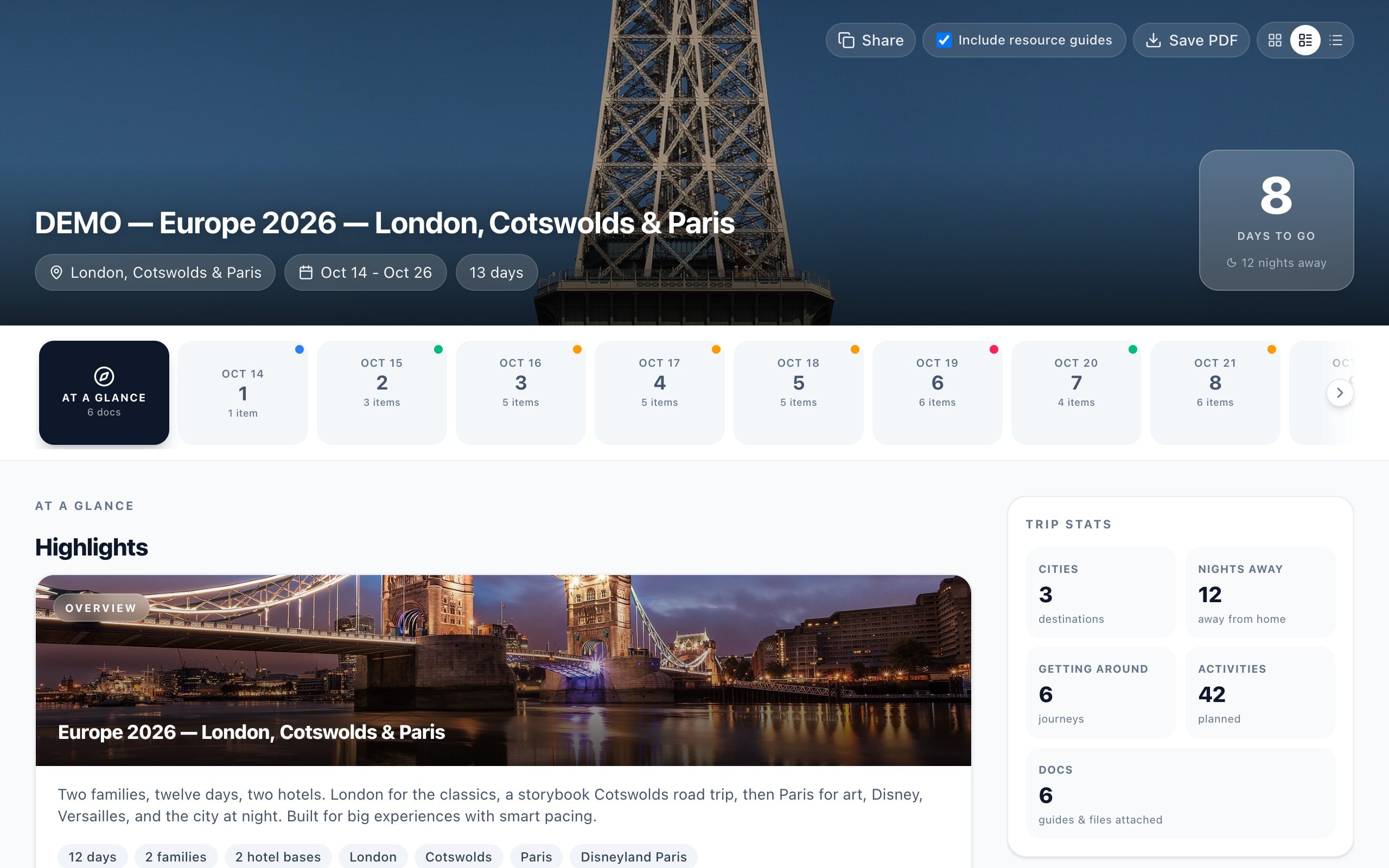
Visual planning that matches how travel agents think
JourneyFuse organizes itineraries by day, not by a flat list of bookings. Drag segments between days, add notes for each activity, and include images that bring the trip to life before the client leaves home.
Branded delivery your clients will remember
Itineraries are shared through a modern client portal under your brand. Clients see their full trip on any device with real-time updates if you make changes. No more emailing Word documents or PDFs that get lost in inboxes.
Connected to the rest of your workflow
Unlike standalone itinerary tools, the JourneyFuse itinerary builder is part of the same platform where you manage leads, trips, proposals, payments, and commissions. Build the itinerary and everything else stays connected.
Built for agencies and teams, not just solo advisors
Agencies get shared itinerary templates every advisor can start from, so the whole team sends work that looks like it came from one brand. Owners and admins can see itineraries across the agency, while each advisor keeps their own client relationships. Branding is set once at the agency level — logo, colors, and typography flow through to every itinerary automatically, including advisors' own custom domains.
Free itinerary builders, and what they actually cost
There are genuinely free ways to build a travel itinerary — a Canva template, a Google Doc, or the free tier of a presentation tool. They work for your first few trips. What they cost you is time: reformatting the same layout for every client, manually updating a document when a flight changes, and re-sending a file that may never get opened. A purpose-built itinerary builder removes that repetition, and JourneyFuse includes one in the base $25/mo plan with a 30-day free trial and no credit card required — so you can rebuild a real trip in it before deciding.
Multi-day programs, groups, and tour operators
Longer programs are where day-by-day structure earns its keep. Group trips can layer a shared master itinerary with each traveler's personal one, so everybody sees the group schedule alongside their own flights and room details without you maintaining two documents. Cruise sailings pull in port days automatically, and land programs before or after a sailing sit in the same timeline.
What You Get
- Drag-and-drop day-by-day itinerary builder
- Branded itinerary templates with your logo and colors
- Embedded images, maps, and activity descriptions
- Mobile-friendly client portal for on-the-go access
- PDF and print export options
- Itinerary templates for common trip types you can reuse
- AI booking import that builds days from forwarded confirmation emails
- Shared agency templates so a whole team sends consistent work
- Group itineraries that layer a master schedule with each traveler's own
- Automatic cruise day-by-day port schedules for booked sailings
Itinerary
Itinerary in progress
Maui & Big Island, Hawaii
Day-by-Day Planning
Build itineraries that make the trip feel real before departure.
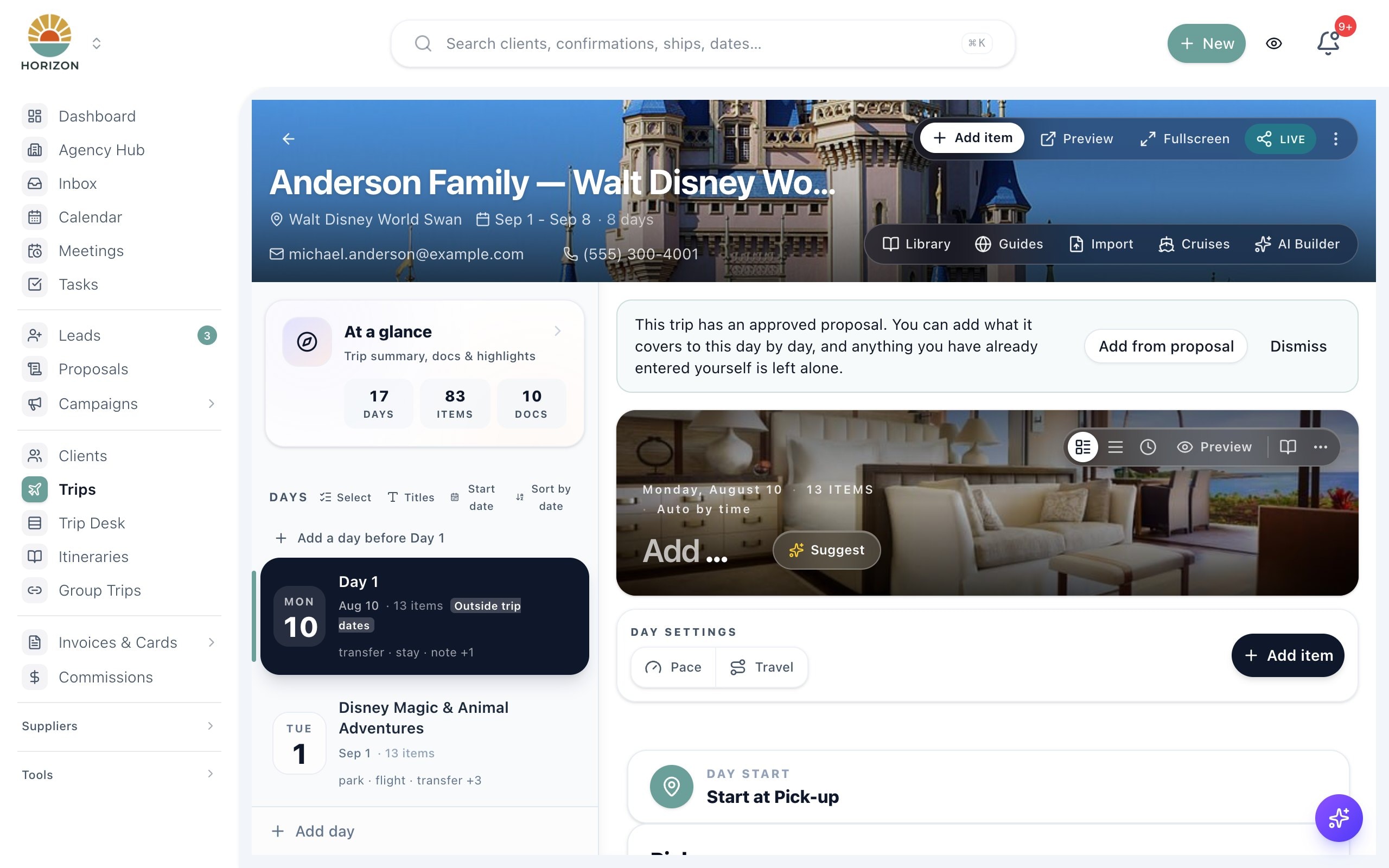
The itinerary builder organizes every detail by day: departures, check-ins, activities, and dining. Add images and descriptions to bring each segment to life for your clients.
- Day-by-day sidebar for quick navigation across multi-day trips
- Rich segments with photos, ratings, and booking details
- Library and guides panel for reusable content blocks
- Preview and share directly from the builder
Why travel agents need a purpose-built itinerary builder
Spreadsheets, Word documents, and Canva templates might work for a few trips, but they break down quickly as your business grows. You end up reformatting the same layouts, manually updating details when bookings change, and emailing revised documents that clients may or may not open.
JourneyFuse's itinerary builder solves this by giving you a structured, visual tool designed specifically for travel itineraries. Each day of the trip gets its own section where you can add flights, hotels, transfers, activities, dining reservations, and free-text notes. Drag items between days when plans shift.
The finished itinerary lives in a branded client portal that travelers can access from any device. When you make updates, clients see the latest version instantly without another email chain. You can also export to PDF for clients who prefer a printed copy.
Because the itinerary builder is part of JourneyFuse and not a standalone tool, it connects directly to your trip record, booking details, and client profile. No duplicate data entry, no switching between apps.
That connection is what removes most of the typing. Forward a supplier confirmation to JourneyFuse and the AI booking import reads it — airline, flight numbers, hotel, check-in and check-out dates, confirmation number — and builds the trip and its days for you. For cruises, booking a sailing pulls the published port schedule straight into the itinerary, so sea days and port calls land on the right dates without being entered by hand. Most advisors find the itinerary is largely built before they open the builder at all; the work becomes editing and adding personality rather than transcription.
The difference shows up most on changes. When a flight moves or a hotel is swapped, you update the booking once and every place that detail appears updates with it — the itinerary, the client portal, the PDF if you export a fresh one. There is no second document to remember. Clients holding the link always see the current version, which is the single biggest practical advantage over emailing a file: you stop tracking which version of the trip each traveler is looking at.
It also matters what happens after the itinerary is built. A finished itinerary can become the basis of a proposal the client accepts and pays from, and once the trip is booked the same record carries the payment schedule and the commission you are owed. Standalone itinerary tools stop at the document. Choosing one means the rest of that workflow lives somewhere else, and the details have to be kept in sync by hand — which is the specific cost most advisors are trying to remove when they start comparing options.
Try it on your next trip
30-day free trial. $25 per advisor per month, or $20 billed annually.
FAQ
Common questions about the itinerary builder
See JourneyFuse in action
Watch how travel advisors use JourneyFuse to run their entire business from one platform.
Ready To Evaluate?
Build itineraries your clients will love.
Start the free trial and see how JourneyFuse makes trip planning faster and more professional.