Travel Commission Tracking
Travel commission tracking from the booking to the bank to the advisor payout.
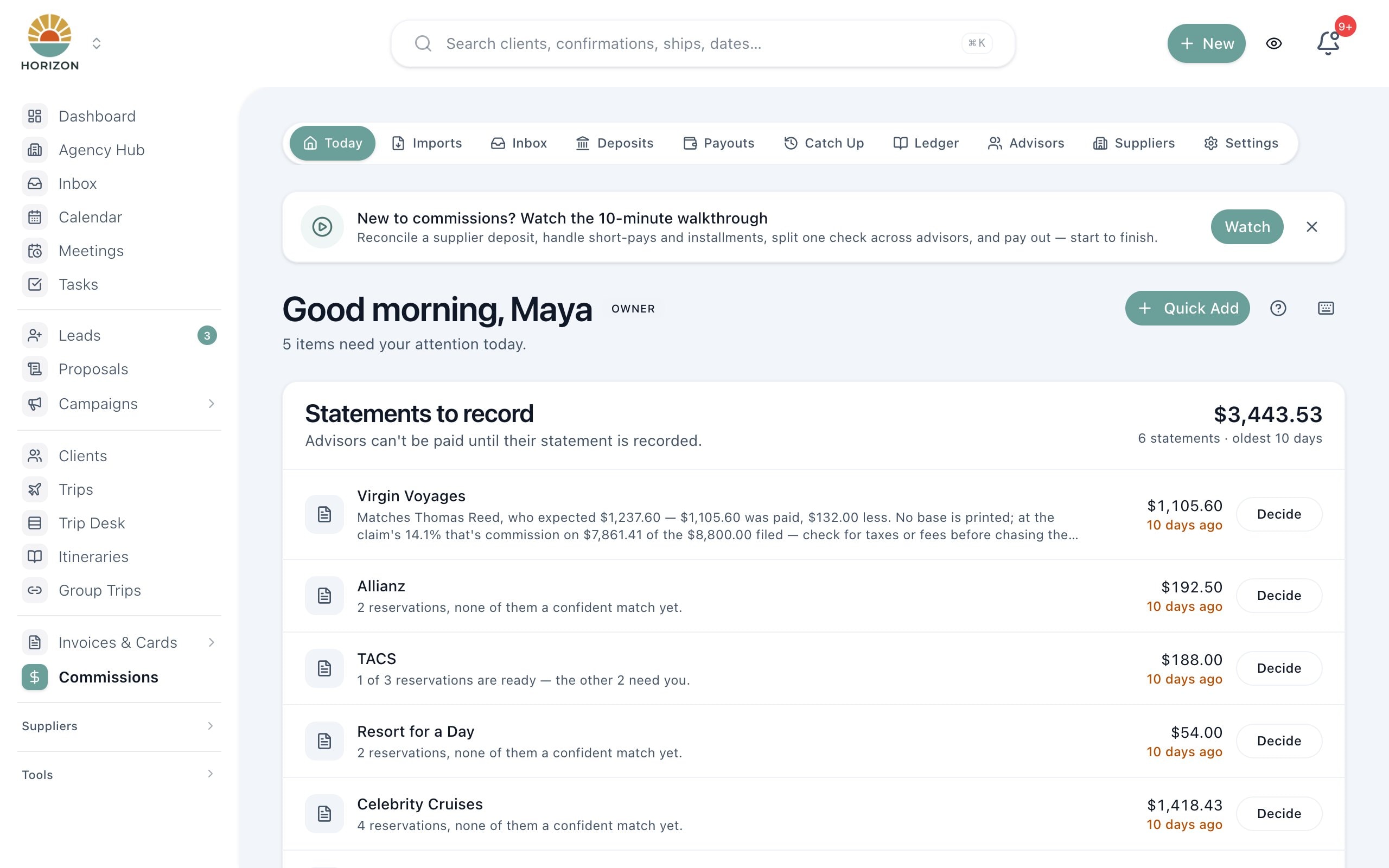
JourneyFuse attaches a commission to every booking and follows it from expected to submitted, received and paid. Forward a supplier statement and it is read and matched line by line. Solo advisors see what they are owed, and agency owners reconcile deposits and pay advisors from the same record.
- Track expected, submitted, and received commissions per booking
- See outstanding commissions across all suppliers in one dashboard
- Give agency owners full visibility into team-wide revenue
A commission on every booking
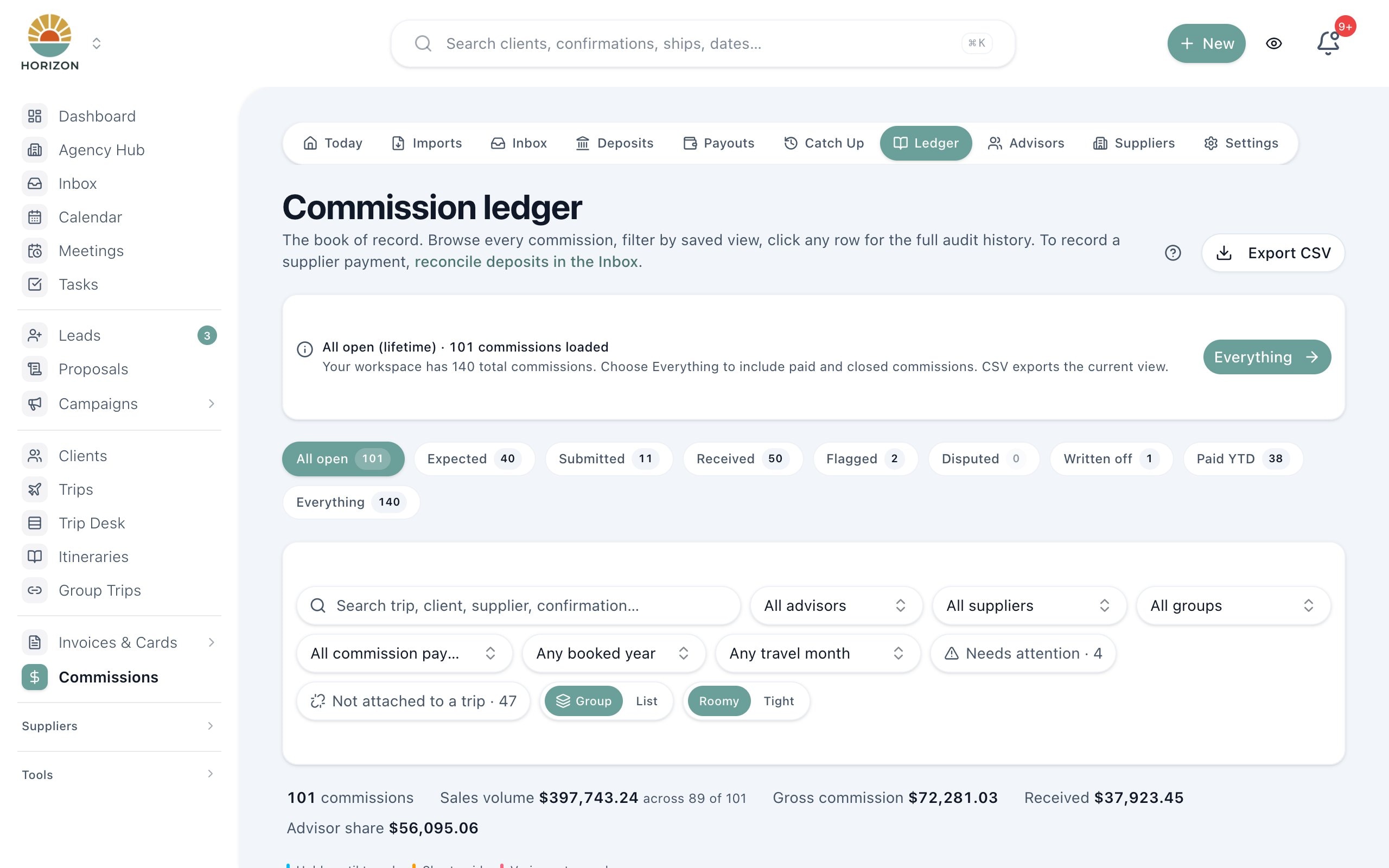
Each booking can carry a commission entry with the gross amount, the advisor's split and amount, the expected date, the date received and the supplier's confirmation number. A single stage tracks it from expected and submitted to received, accepted, ready for payout and paid to agent, with written off and disputed for the ones that go sideways.
Supplier statements read for you
Forward a supplier remittance, with its PDF, spreadsheet or CSV attached, to your agency's import address. You can also paste a statement or record a payment by hand. JourneyFuse reads each reservation on the statement, compares it with the commissions you expected, and checks the statement total against the line amounts before anything is processed.
Travel commission reconciliation without forcing a match
Suggested matches show the reservation, guest, travel date and advisor, and Match detail puts the advisor's claim beside the statement line. Short-pays, installments and one payment split across several advisors are handled openly. A fee the supplier deducted from the payment is recorded as a fee, so the deposit reconciles without reading as a shortfall.
Know which suppliers need a claim
Classify each supplier as auto-pay, claim required or needing reminders. When a claim-required trip ends, JourneyFuse moves its commission to Needs filing and surfaces it on the Today page, so the claim is filed before the money is lost. Rate changes take an effective date, so older bookings keep the rate that was in force when they were booked.
From bank deposit to advisor payout
Before paying advisors, confirm the supplier's money actually reached the bank by connecting QuickBooks Online or uploading a bank export. Take a host fee before the split, pay mentors a share of their mentees' commissions, hold large or first-time payouts for review, and pay advisors through a connected Dots account. W-9 collection and 1099-NEC export data are built in.
Forecasts, reports and exports
The commission forecast shows 13 months of settled, pending and at-risk commission. Commission reports filter the agency ledger and export it. Record sales volume to see where you stand against supplier commission tiers, keep FAM trips and your own travel out of totals, and catch up past trips in bulk, each dated to the day it completed.
What You Get
- Per-booking commission tracking with expected and received amounts
- Supplier-level commission reporting and follow-up
- Agent-attributed commissions for team environments
- Outstanding commission alerts and aging visibility
- Commission reconciliation tools for matching payments
- Exportable commission reports for accounting
Commission
Awaiting supplier payment
Commission submitted to the supplier
Commission Dashboard
Know what you are owed. Know what has been paid.
The commissions dashboard shows every outstanding and received commission across all suppliers and agents. No more cross-referencing spreadsheets or wondering which suppliers still owe you money.
- Outstanding commissions surfaced with supplier and booking context
- Submission and receipt status tracked per booking
- Agent-attributed view for host agencies and multi-advisor teams
- Exportable reports for accounting and tax season
What system helps travel agents track commissions and supplier bookings?
Commission tracking for travel agents breaks in predictable places. A booking changes and the spreadsheet row does not. A supplier pays one lump sum for six reservations with no obvious reference. A tour operator never pays because nobody filed the claim. An advisor asks when they will be paid, and the answer depends on a deposit nobody has confirmed. A system that actually helps has to handle each of those, not just store an expected amount. Each of those failures looks small on its own, but across a year of bookings they add up to commission that was earned and never collected.
JourneyFuse starts at the booking. Whether a sale is typed in, imported from a supplier confirmation or created when a client accepts a proposal, the booking carries its own commission line calculated from its own price. Swap or cancel the booking and its history, payments and commission records stay with it. Because the commission and the supplier booking are the same record, there is no second list to keep in sync. Supplier rate changes take an effective date, so an older booking keeps the rate that was in force when it was booked.
Travel commission reconciliation is the second half. Forward the supplier's remittance email and JourneyFuse reads each reservation, then suggests the booking it paid using the confirmation number, guest, travel date and advisor. You review the Match detail before accepting anything. Differences are handled rather than hidden: a different commissionable base, a product-specific rate, a booking that changed, or a fee the supplier deducted. Payments that arrive with no matching booking can be claimed by the advisor who made the sale.
For agencies, travel agent commission processing continues past the match. Owners confirm the money reached the bank through QuickBooks Online or a bank export, apply host fees and splits, hold large payouts for a closer look, and pay advisors through Dots. Advisors see their own share and its stage throughout, so the question of when they will be paid has a visible answer instead of an email thread. A held payout can also release on its own after a set number of days, if you choose.
Solo advisors get the same tracking without the agency layer. If your host agency does not use JourneyFuse, it still works as your personal ledger: what you submitted, what the host has paid, and what is past its expected date. Import your commission history from a spreadsheet, export the ledger for your accountant, and stop keeping a separate system alongside your bookings. The commission forecast shows what has settled, what is pending and what is past its expected date, month by month.
Try it on your next trip
30-day free trial. $25 per advisor per month, or $20 billed annually.
FAQ
Common questions about travel commission tracking
See JourneyFuse in action
Watch how travel advisors use JourneyFuse to run their entire business from one platform.
Ready To Evaluate?
Stop chasing commissions. Start tracking them.
Start the free trial and see every commission tied to the booking it belongs to.