How Commissions Get Paid (Agency Owner)
Last updated September 11, 2026
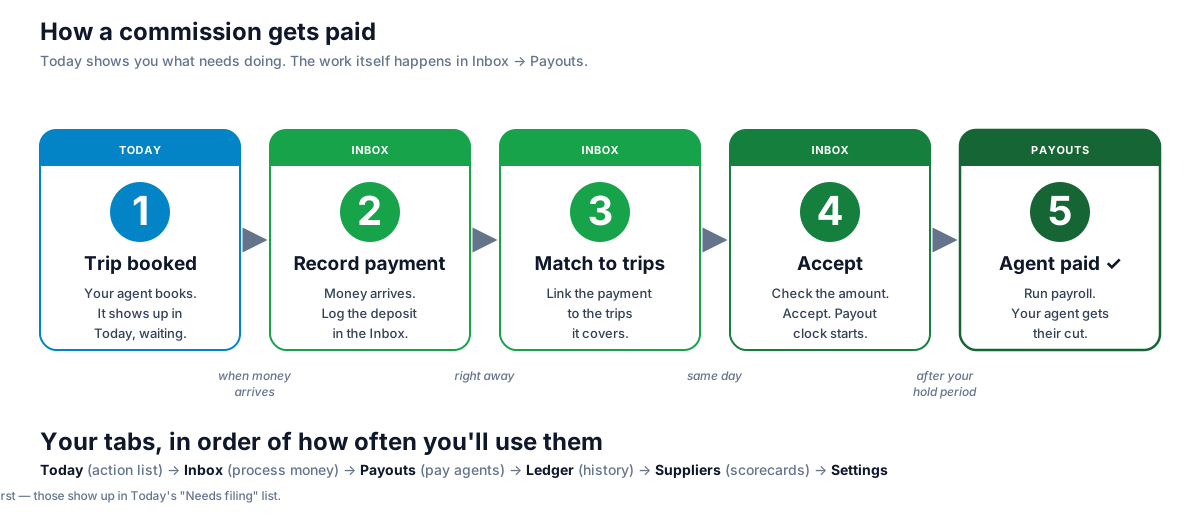
Five steps, left to right. Today tells you what needs doing. The work itself happens in Inbox, then ends in Payouts.
Video walkthrough
See the whole flow in action (~10 min): auto-matching a supplier deposit, a clean match, a short-pay you close out, installments, splitting one check across several advisors, and importing statements. ▶️ Watch on YouTube
The five steps
1. Trip booked — Today tab
Your agent books a trip. JourneyFuse starts tracking the commission automatically.
You do: nothing. It shows up in Today, waiting.
2. Record payment — Inbox tab
The supplier sends you money — a check, an ACH, a statement with 12 commissions on it. You log the deposit in your Inbox.
You have three ways to bring a statement in:
- Forward by email — supplier emailed you a statement? Forward it to your workspace's commissions address (
commissions+<your-slug>@mail.journeyfuse.com, shown with a Copy button on the Inbox + Imports tabs). We extract every line item automatically. - Upload or drop a file — click Import statement (AI) → drop a PDF, XLSX, CSV, or screenshot (PNG/JPG) into the modal, up to 15 MB. AI parses it; you review and confirm. Best for supplier portal exports (RCCL, Hilton) and backfilling old statements.
- Record manually — click Record payment for one-off ACH deposits, checks, or wires that didn't arrive by email. Pick payer + amount + date + method + ref → save. In Reference, put the supplier's reservation number for that booking, not the check or document number — the reservation number is what the matcher compares against your bookings. One check covering several bookings is several lines, each with its own reservation number. See Commission Matching for what to check when a payment doesn't match.
3. Match to trips — Inbox tab
Link that payment to the specific trips it covers. If they paid you $2,400 for three bookings, you match each to the right commission.
👉 Click the payment → Match → pick the commissions
4. Accept — Inbox tab
Check what they paid vs. what you expected, then accept. The payout clock starts for your agent.
👉 Review variance → Accept
5. Pay your agent — Payouts tab
Once your hold period is up, the commission shows in Payouts, grouped by agent. Run payroll.
👉 Select → payment method → Mark paid (optionally email a statement PDF)
The pay dialog has a Paid on date that defaults to today. Backfilling payouts from previous years? Set it to the date the money actually went out and that's the date recorded on the payout. (It's separate from "Expected in advisor's bank," which only feeds the statement email — leave that alone when backfilling, and uncheck the statement email so advisors don't get a notice about an old payout.)
Your tabs, in order
| Tab | What it's for | How often you'll use it |
|---|---|---|
| Today | Your action list — everything that needs attention | Every morning |
| Inbox | Record payments, match, accept, review agent submissions | Whenever money or work arrives |
| Payouts | Pay your agents what they've earned | Payday (weekly / bi-weekly) |
| Ledger | Full history, searchable — for audits, disputes, reports | When you need to look something up |
| Suppliers | Scorecards — who's slow, who's fast, who has variance | Weekly glance |
| Settings | Defaults — split %, hold period, supplier terms | Rarely (setup only) |
What lives in the Inbox
Your Inbox has five buckets, ordered as a tab bar. The Inbox opens on the highest-priority non-empty bucket automatically — so you always land on something to do.
| # | Bucket | What it is | Your move |
|---|---|---|---|
| 1 | Unmatched payments | Deposits you've recorded that aren't tied to specific bookings yet | Match — open the wizard, check the commissions this deposit covers, save |
| 2 | Pending submissions | Advisors have submitted commissions for your approval | Approve (one click) or Review + send back |
| 3 | Variance flags | Supplier paid an amount that doesn't match what you expected | Pick a reason, add a note, save |
| 4 | Awaiting supplier | Expected commissions that have not been matched to supplier money yet | Review what is due or overdue and follow up with the supplier |
| 5 | Needs filing | Trips ended for a claim-required supplier where you haven't filed | File claim — opens the supplier-specific filing dialog |
Every morning: open Inbox, work through the buckets, close them out.
For a deeper walkthrough of each bucket with example flows, see the Agency Commissions Dashboard article.
Quick-review pending submissions
When an agent submits a commission for your approval, it shows up in the Pending submissions bucket. You don't have to leave the Inbox to act on it:
- Approve — one click on the row. Most submissions are fine; this is the fast path.
- Review — expands the row inline with the at-a-glance data (gross, agent amount, split %, reservation, advisor notes) plus a text box for your note back to the advisor. From there you can Approve with note or Send back — needs attention.
No page navigation needed. Ten pending submissions → ten clicks → all cleared.
One more thing: filing claims
Some suppliers don't pay automatically — airlines and certain hotels need you to file a claim first. Those show up in Today's "Needs filing" list and in the Inbox's "Needs filing" bucket. Click, pick a method (portal, email, form, manual), file it. Most suppliers won't need this.
What if something goes sideways
- Disputed — the supplier says your amount is wrong. Held out of payouts until resolved.
- Written off — you've decided you'll never collect. Terminal — closes the line.
- Recalled — you matched a supplier payment, then realized it was wrong. You can un-match, but only before any agent has been paid from it.
Built-in safety
JourneyFuse won't let you:
- Double-pay an agent — even if you click "Mark paid" twice fast.
- Pay early — hold period is enforced automatically.
- Mix agents in one batch — each payout is one agent at a time.
- Let an agent handle money — recording, filing, paying all require owner or admin.
Related
- Commission Matching — how matching works, the daily routine, and why a payment didn't match
- Commissions Workflows by Role
- Commission Reconciliation
- Commissions Agency Dashboard
Related Articles
Migrating from TravelJoy
Bring your TravelJoy clients, trips, bookings and commission history into JourneyFuse. Two self-serve exports carry it, and we migrate it free.
Migrating from TESS
Bring your TESS export into JourneyFuse. Drag-drop the .xlsx, preview what comes over per sheet, then confirm — nothing imports until you say so.
Meta Pixel & Ad Tracking
Add your own Facebook and Instagram pixel to your landing page and booking links, so your Meta ads can report and optimize on real bookings.